What is GST Number | GSTIN? Everything You Need to Know
Estimated reading time: 9 minutes
A GST number, also known as a GSTIN (Goods and Services Tax Identification Number), is a unique 15-digit code assigned to every business that registers under the GST system in India. It helps the government identify your business for tax purposes and ensures smooth tracking of GST collections and payments. This number is mandatory for companies whose turnover crosses the GST threshold or who want to claim input tax credit. The GST number is used in all invoices, return filings, and tax documents, making it an essential part of doing business legally in India.
For small and medium-sized businesses (SMEs) in India, knowing the GST Identification Number is crucial. It helps simplify tax processes, build credibility, and access benefits like input tax credits. Businesses must also register for GST and enter the GSTIN during their registration process to comply with the regulations.
Definition and Explanation
Businesses that make over ₹40 lakh require a GST Identification Number. For northeastern states, the limit is ₹20 lakh. Companies conducting inter-state commerce also require it. Registered taxpayers use this number to file returns, generate invoices, and conduct transactions under the unified GST framework.
Format of the GST Number
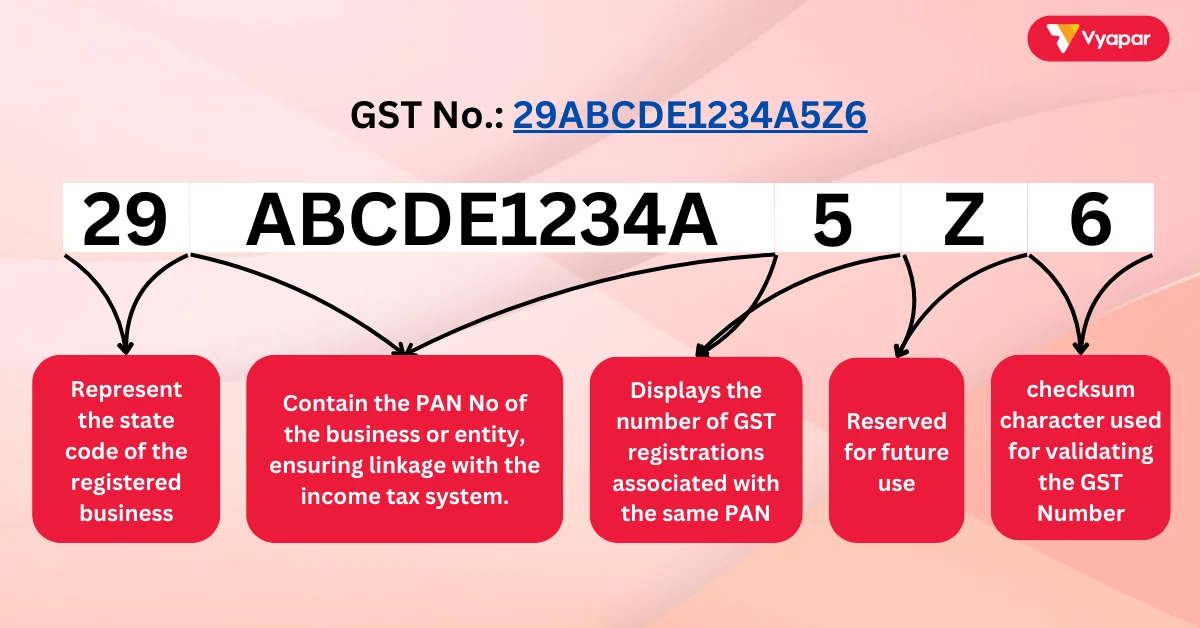
It has a standardized 15-character structure:
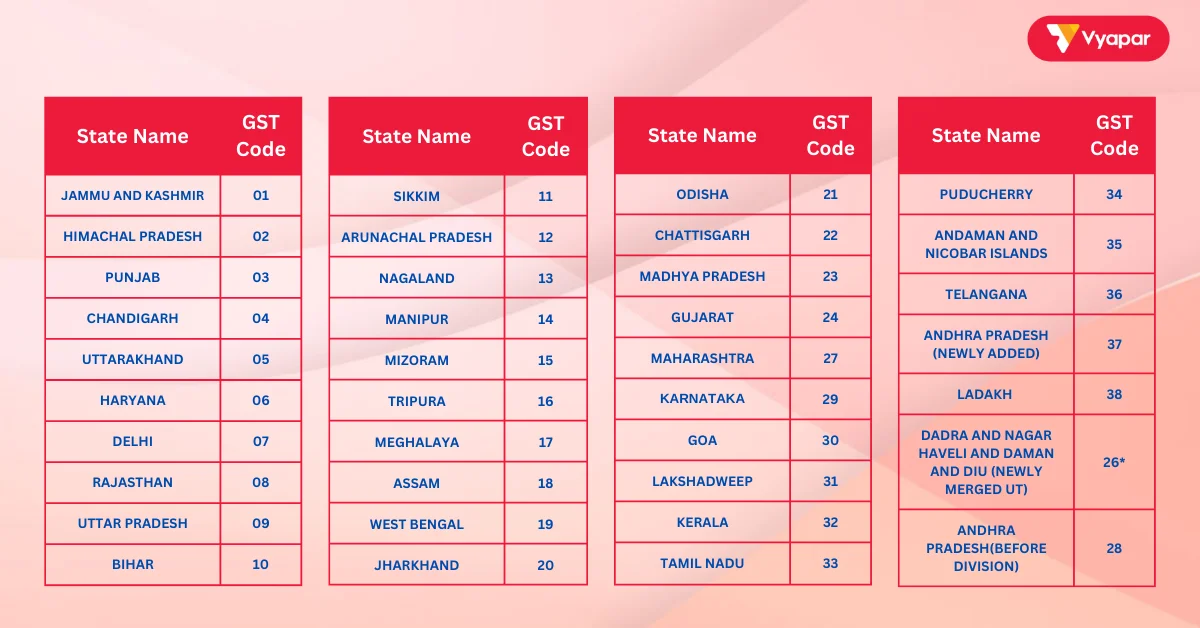
- First Two Digits: Represent the state code of the registered business (e.g., 27 for Maharashtra, 07 for Delhi).
- Next Ten Characters: Contain the PAN of the business or entity, ensuring linkage with the income tax system.
- Thirteenth Digit: Displays the number of GST registrations associated with the same PAN. For example, use 1 for the first registration and 2 for the second.
- Fourteenth Digit: Reserved for future use and currently has no operational significance.
- Fifteenth Digit: A checksum character used for validating the GST Number, generated through an algorithm.
For instance, 29ABCDE1234A5Z6 represents a business located in Karnataka (29). The system links to PAN ABCDE1234A. This is its Fifth registration (5) and has a checksum of 6 for validation.
Here is the List of All States “GST Code” in India
Key Takeaways on GST Number
✅ It is a mandatory 15-character alphabets and numeric identification code for businesses registering under the GST framework.
✅ It is essential for filing returns, issuing GST-compliant invoices, and claiming input tax credits.
✅ Getting a GST Identification Number is free. You can apply for it online at the official GST website.
✅ The GST Identification Number format includes the state code, PAN, and a validation digit to ensure accuracy.
Types of GST Registration
- Regular Registration: For businesses with turnover above ₹40 lakh or engaged in inter-state trade.
- Composition Scheme: For businesses with turnover below ₹1.5 crore, offering simplified compliance and lower tax rates.
- Casual Registration: For temporary businesses like stalls at exhibitions.
- E-commerce Registration: Mandatory for businesses selling products or services online.
Importance of GST Number
- Legal Compliance: Businesses meeting turnover criteria or conducting inter-state trade must have a GST Number to operate legally.
- Input Tax Credit: It lets businesses claim credits for the GST they paid on purchases. This aids in reducing their tax liabilities.
- Filing Returns: It is crucial for filing GST returns on the official GST portal and avoiding penalties.
- Credibility and Trust: Being a GST-registered business increases credibility and fosters trust among clients, suppliers, and customers.
- Market Access: GST-registered businesses can trade across states without additional taxes or compliance barriers.
How To Apply For GST Number
Step 1: Visit the Official GST Portal
Go to the GST website: https://www.gst.gov.in
Step 2: Start New Registration
- Click on ‘Services’ > ‘Registration’ > ‘New Registration’
- Choose ‘Taxpayer’ as your type of registration
- Enter details like:
- State and district
- Legal name of your business (as per PAN)
- PAN of the business or owner
- Email ID and mobile number
- Submit and verify the OTP sent to your email and phone.
Step 3: Get Temporary Reference Number (TRN)
After OTP verification, you’ll receive a Temporary Reference Number (TRN). Save it to continue the application later.
Step 4: Fill Part B of the Form
Use the TRN to log in again and complete Part B. Here you’ll need to provide:
- Business details (trade name, constitution, start date)
- Promoter/owner details
- Principal place of business (address, nature of premises)
- Bank account details (account number, IFSC code)
- Goods and services details (what you deal in)
- Upload documents (PAN, Aadhaar, photos, address proof, business proof)
Step 5: Verification and Submission
- Verify all details using Aadhaar e-KYC or Digital Signature (DSC)
- Submit the application
Step 6: Receive GSTIN
Once approved, you’ll get your GST number (GSTIN) by email and SMS. You can also download your GST registration certificate from the portal.
Benefits of GST Number for SMEs
- Simplified Tax Filing: Filing returns becomes easier when businesses enter their GSTIN on the government portal, ensuring compliance.
- Cost Savings: Businesses can claim input tax credits, offsetting the taxes paid on their expenses and purchases.
- Broader Business Opportunities: GST registration allows businesses to access inter-state and global markets seamlessly.
- Professional Image: GST-registered businesses appear more credible and reliable to partners, suppliers, and customers.
How GST Number is Used in Business Operations
- Filing Returns: Registered taxpayers must have a GST Number to file their returns. This includes monthly, quarterly, and annual filings.
- Invoice Generation: All GST-compliant invoices must show the GST Identification Number of the business. Everyone needs this to follow GST rules.
- Claiming Input Tax Credits: Businesses can use their GST Identification Number to claim input credits for GST paid. It reduces their tax liability.
- Inter-State Trade: It facilitates seamless transactions across state borders without additional taxes.
- Search by GSTIN UIN: Use the portal to verify any GSTIN through the search by GSTIN UIN option.
How Vyapar App Helps You with GST Number Management
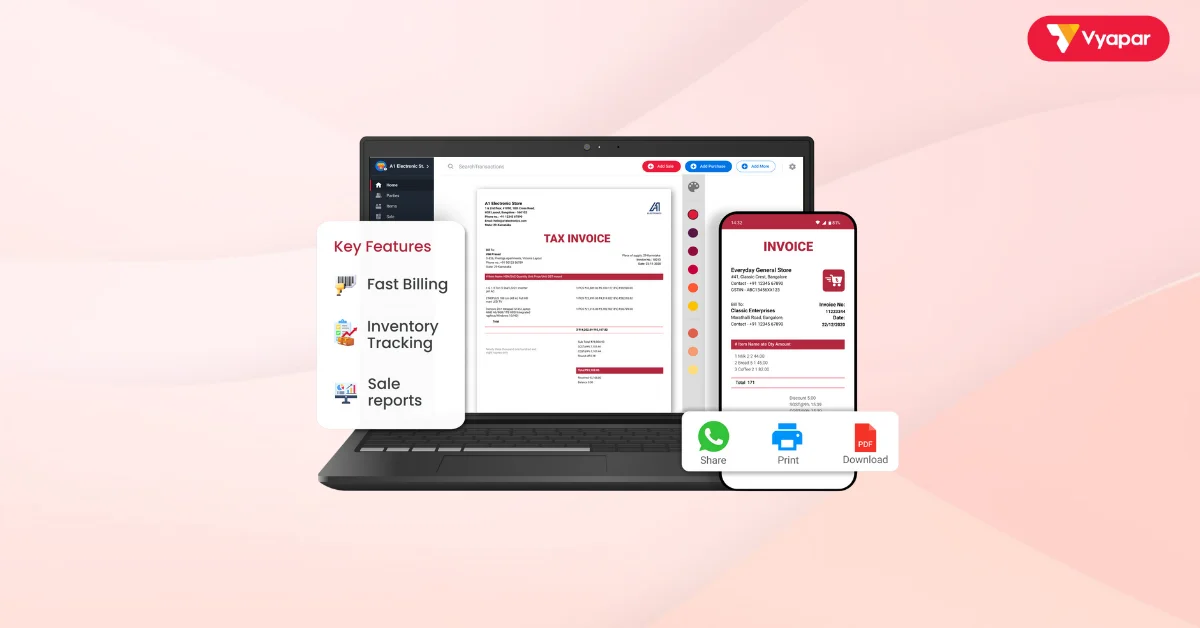
The Vyapar App makes GST management simple and stress-free:
- GST-Compliant Invoicing: Quickly generate invoices with your GST Number pre-filled.
- Automated Tax Filing: Prepare and file GST returns without errors or missed deadlines.
- Track Input Tax Credits: Easily track and claim eligible credits.
- Error-Free Validation: The app checks GST Numbers automatically.
- User-Friendly Dashboard: Manage documents, filings, and invoices in one place.
With Vyapar, you can focus on growing your business while staying compliant with GST regulations.
Are you a Business Owner?
Take your business to the next level with Vyapar! Use free trail!
Try our Android App (FREE for lifetime)
FAQ’s
No, it’s required only for businesses exceeding ₹40 lakh turnover or engaging in inter-state trade.
It takes 2–7 working days if you submit all required documents correctly.
Yes, individuals providing taxable goods or services can register for GST.
Registering for GST is free of cost via the official GST portal.
Yes, if a business operates in multiple states, it must have a GST Number for each state.
You can verify it on the GST portal using the search taxpayer option or search by GSTIN UIN. It will be directly verified in the Vyapar App just by entering the GST Number in Party Details.
You need to provide PAN, Aadhaar, bank details, proof of business address, and a photo.
Related Posts: