I’m a business enthusiast with 8+ years of experience in business management and finance, holding a Bachelor of Business Management (BBM) in Marketing and an MBA in Finance. With expertise in marketing, accounting, financial management, business law, MIS, and business economics, I focus on simplifying complex business and finance topics into clear, practical insights for entrepreneurs, professionals, and students.
Vyapar Editorial Team represents the officially authorized content and review function at Vyapar App, a business management, billing and accounting software used by millions of SMEs. Articles published under this author are created and reviewed by subject-matter experts to ensure accuracy, compliance, and practical business value.
Excel is a common starting point for small business accounting. It works well when transactions are limited, but managing sales, purchases, inventory, expenses, and GST in separate sheets becomes difficult as a business grows.
So, when should you switch from Excel to accounting software? Let’s compare both options and understand what works best at different stages of business growth.
Excel vs Accounting Software: At a Glance
Excel and accounting software can both help businesses maintain financial records, but they handle everyday accounting tasks differently.
Business Need
Excel
Accounting Software
Record sales and purchases
Entered manually
Recorded as business transactions
Track expenses
Separate entries or sheets
Record and categorise expenses
GST accounting
Requires formulas and manual checks
GST features and reports can simplify the work
Customer outstanding
Needs regular updates
Party-wise balances can be checked
Inventory management
Often maintained in separate sheets
Sales and purchases can be linked with stock
Ledgers
Separate sheets or formulas
Generated from transactions
Profit & Loss
Requires formulas and updates
Generated from accounting records
Balance Sheet
Requires accounting setup
Generated from accounting records
Data backup
Usually needs manual copies
Backup options depend on the software
Multiple users
File sharing can become difficult
Controlled access may be available
Excel remains practical for simple business records. Accounting software becomes more useful when sales, purchases, inventory, payments, and financial reports need to work together.
When Is Excel Enough for a Small Business?
A small business does not necessarily need accounting software from the day it starts. If you handle a few transactions, have simple expenses, and manage your records yourself, Excel may be enough.
Excel works well in situations such as:
New or small businesses: You have just started and maintain basic sales and expense records.
Few daily transactions: You generate around 5–10 bills a day.
Single-person accounting: Only you or one trusted person manages the records.
Simple inventory: You sell a limited number of products and do not need detailed stock tracking.
Limited reporting needs: You do not regularly prepare detailed financial reports.
Comfortable with spreadsheets: You understand formulas and can maintain accurate records.
For example, a home-based business selling handmade products may receive only a few orders every day. Maintaining a simple Excel sheet for sales, expenses, and payments may be sufficient.
If your current system is working and your records are accurate, there is no need to switch immediately.
Tip: Maintain one master Excel file and save regular backups. Use dated file names to identify the latest version. Protect cells containing important formulas to avoid accidental changes.
Notebook vs Excel vs Accounting Software: Which Is Better?
Businesses can maintain their accounts using paper records, spreadsheets or dedicated accounting software.
Each option serves a different purpose.
Business Requirement
Notebook or Register
Excel or Google Sheets
Accounting Software
Data entry
Fully manual
Manual
Digital transaction entry
Calculations
Manual
Formula-based
Automated calculations
Sales records
Written entries
Separate sheets
Recorded through transactions
Customer dues
Register or diary
Separate sheet
Party-wise balance tracking
Inventory
Manual counting
Manual updates
Stock can be updated through transactions
GST records
Manual calculations
Formulas and checks
GST features and reports
Financial reports
Prepared manually
Formula-based
Generated from recorded data
Backup
Physical copies
Manual backups
Depends on available backup features
Multiple users
Limited
File sharing
Controlled access may be available
Business growth
Difficult to manage at scale
Works for simpler records
Better suited to connected business records
A small business can also combine different options.
For example, you can use accounting software for daily transactions and continue using Excel for budgeting, financial analysis or custom reports.
The important thing is to maintain accurate and consistent primary accounting records.
Where Does Excel Start Creating Problems?
Excel becomes difficult to manage as your business grows. Here are some common problems:
Entering the Same Information Multiple Times: You have to update sales, stock, customer balances and GST records separately.
Incorrect Formulas and Calculations: A small mistake in a formula can lead to wrong totals, expenses or profit figures.
Difficulty Tracking Inventory: You need to update stock manually after every sale and purchase, and one missed entry can cause a mismatch.
Managing Customer and Supplier Dues: Checking who has paid and who still owes money becomes difficult when records are kept in different sheets.
Multiple People Creating Different Files: When employees use different Excel files, sales, stock and payment records may not match.
Taking More Time to Prepare Reports: You have to collect details from different sheets to calculate sales, expenses, profit and pending payments.
Signs Your Business Has Outgrown Excel
There is no fixed transaction limit at which every business should switch to accounting software.
However, the following signs can help you understand whether your current system is becoming difficult to manage.
1. You Maintain Multiple Excel Files: Sales, purchases, expenses, inventory and customer payments are recorded in separate files. Finding complete business information takes extra time.
2. You Enter the Same Information More Than Once: A single transaction needs to be updated in several sheets. This increases manual work and the possibility of errors.
3. You Have Difficulty Tracking Customer and Supplier Dues: You regularly search through spreadsheets or registers to find pending payments and outstanding balances.
4. GST Calculations Take Too Much Time: You manually check GST rates, HSN/SAC details, tax amounts and invoice totals before preparing GST-related records.
5. Your Inventory Is Separate From Your Accounts: You update stock quantities separately from sales and purchase records. Keeping both systems accurate becomes difficult.
6. Monthly Reports Take Hours to Prepare: You spend considerable time updating formulas, combining sheets and checking figures before reviewing your business performance.
7. More Than One Person Handles Accounting: Employees, business owners and accountants need access to the same information. Sharing files creates confusion about which version is correct.
8. You Regularly Correct Spreadsheet Errors: Broken formulas, duplicate entries, incorrect amounts and missed transactions become common.
9. You Cannot Quickly Answer Basic Business Questions: You struggle to find answers to questions such as:
How much did my business sell this month?
Which customers have pending payments?
How much did I spend on purchases?
What is my current stock quantity?
Did my business make a profit this month?
If several of these situations sound familiar, it may be time to consider accounting software.
Practical Signs That You May Need to Switch
The following thresholds are illustrative guidelines, not fixed industry standards.
Business Activity
Indicative Situation
Why It Matters
Daily billing
Around 30 or more bills
Manual entry becomes repetitive
Inventory
Around 200 or more items
Stock updates become harder
Staff
Two or more people
Shared files can create errors
Credit customers
Around 20 or more
Tracking outstanding payments takes longer
GST work
Regular GST reporting and reconciliation
Manual checking requires more effort
Business locations
More than one shop or godown
Separate stock records become difficult to manage
Accounting time
Five or more hours every week
More time goes into maintaining records
You do not need to meet every threshold. Even a few of these situations may indicate that your business needs a more organised accounting system.
What Does Staying on Excel Really Cost Your Business?
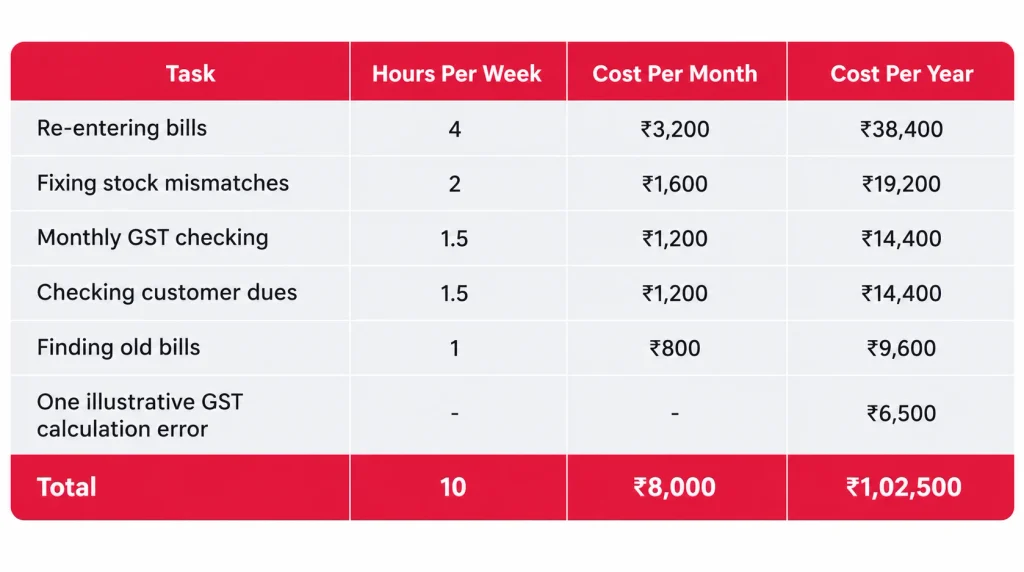
Excel may look like a free option, especially when you already have it installed. However, the actual cost of managing accounts also includes the time spent entering information, correcting mistakes, and preparing reports.
Consider a hypothetical small retail business that values its working time at ₹200 per hour.
Note:These are assumed figures for illustration, not industry averages or guaranteed savings. The GST error example is also illustrative.
In this example, the business spends approximately ₹1,02,500 worth of time and money annually on accounting-related activities.
Software will not eliminate every task. You will still need to enter sales, purchases, payments and other business information. However, reducing repeated entries and manual calculations can save valuable time.
Before choosing software, compare its annual cost with the time your business currently spends maintaining accounts.
Which Accounting Tool Fits Your Business?
The right option depends on your daily operations, transaction volume, inventory and reporting requirements.
Here are a few examples.
Home-Based Seller: A home-based seller generating five bills daily and maintaining simple sales and expense records may be comfortable using Excel.
Kirana Store: A kirana store generating 60 bills daily may benefit from billing software that also helps maintain sales and stock records.
Pharmacy: A pharmacy managing multiple products, batches, expiry dates, purchases, and customer billing may need software with suitable inventory features.
Wholesaler or Distributor: A wholesaler handling credit customers, supplier payments and regular purchases may benefit from connected accounting and inventory records.
Manufacturer: A growing manufacturing business may need better coordination between raw materials, production expenses, finished goods, purchases and sales.
Private Limited Company: A company maintaining its books through accounting software must also consider the applicable audit-trail requirements when selecting its software.
How to Move From Excel to Accounting Software Without Losing Data
Switching from Excel does not mean you need to transfer every historical transaction immediately.
A planned migration makes the process easier and reduces the chances of missing important information.
Step
What to Do
Helpful Tip
1. Choose a switching date
Start from the first day of a month or financial period
This makes transaction reconciliation easier
2. Close your Excel records
Complete entries up to the previous day
Save a read-only backup
3. Organise customer and supplier details
Keep names, GSTINs, phone numbers and addresses ready
Remove duplicate entries
4. Clean your item list
Organise item names, HSN codes, tax rates, units and prices
Check applicable GST rates
5. Prepare opening balances
Record cash, bank, customer dues, supplier dues and stock
Confirm balances with your CA
6. Import and test
Import supported business information and test transactions
Check totals and stock quantities
7. Run both systems temporarily
Compare daily sales, purchases and stock
Investigate any differences
8. Stop duplicate entries
Make the new software your primary accounting system
Use Excel for exports and analysis when required
A Few Things to Remember
Keep your old Excel files and backups according to applicable record-retention requirements.
Do not import duplicate customer or product entries.
Verify opening balances before using the new system.
Test a few sales and purchase transactions before going live.
Check whether your software supports the data import formats you currently use.
Can You Still Use Excel After Switching?
Yes. Switching to accounting software does not mean you have to stop using Excel. Excel is still useful for activities that require custom calculations and analysis.
You can continue using it for:
Business planning: Prepare future business plans and sales targets.
Budgeting: Estimate monthly expenses and expected revenue.
Custom calculations: Create calculations specific to your business.
Data analysis: Study exported sales and purchase information.
Working sheets: Maintain temporary calculations and business notes.
The important thing is to avoid maintaining multiple versions of your primary accounting records.
Use one organised system for your main business transactions and use Excel wherever additional flexibility is needed.
How to Manage Your Business Accounting With Vyapar Accounting Software
If maintaining multiple spreadsheets is becoming difficult, accounting software can help bring everyday business records together.
Vyapar accounting software is designed for small businesses in India to manage their regular billing, inventory, and accounting activities.
Here are some ways it can help.
Record Sales and Purchases: Create sales invoices and purchase entries to maintain your business transaction records. Instead of updating separate spreadsheets for every transaction, you can manage your regular business entries through the software.
Manage GST Invoices and Reports: Create GST invoices, add HSN/SAC details and manage applicable GST calculations and related reports using GST billing software. This helps keep your billing and GST-related business records organised.
Manage Customer and Supplier Ledgers: Maintain party-wise transaction records to check customer and supplier balances. This makes it easier to review pending payments and transaction histories.
Track Business Income and Expenses: Record regular business expenses and payments to maintain a clearer picture of your business finances.
Review Financial Reports: Use available accounting reports such as:
Profit & Loss Statement
Balance Sheet
Trial Balance
Ledger Reports
Cash and Bank Reports
GST Reports
These reports help you review different aspects of your business accounts.
Import Item Details From Excel: If you already maintain product information in Excel, Vyapar desktop supports importing item details from Excel. You can also export information when you need to perform additional analysis.
Vyapar accounting software also offers staff access with role-based permissions and automatic Google Drive backup options. Check the available plan and configuration to understand which features are supported for your business.
The goal is not to replace every spreadsheet you use. It is to reduce repetitive accounting work and make your main business records easier to manage.
Conclusion
Excel works well for simple business accounting, but growing businesses often need a more organised way to manage transactions, inventory, GST and financial reports.
When spreadsheets start taking too much time to maintain, accounting software can make everyday business accounting easier.
Frequently Asked Questions
When should I switch from Excel to accounting software?
Consider switching when you spend too much time maintaining spreadsheets, tracking GST, managing customer dues, updating inventory or preparing financial reports. If several of these tasks are becoming difficult, dedicated accounting software may be a better option.
Is accounting software better than Excel?
It depends on your business requirements. Excel works well for simple records and custom calculations. Accounting software is more suitable when you need connected billing, inventory, GST records, ledgers and financial reports.
Can I use Excel and accounting software together?
Yes. You can use accounting software to maintain your primary business records and continue using Excel for budgeting, business planning, custom calculations and data analysis.
Is accounting software useful for small businesses?
Yes. Small businesses can use accounting software to record sales, purchases, expenses, payments and inventory while maintaining ledgers and financial reports. It can reduce repetitive data entry and make everyday accounting easier.
Can accounting software replace manual bookkeeping?
Accounting software can automate several repetitive bookkeeping activities, such as calculations, ledger updates and report preparation. However, businesses still need to enter accurate transaction details and review their financial records regularly.
Does accounting software work without the internet?
It depends on the software. Some desktop and mobile accounting applications support offline operations, while browser-based tools may require an internet connection. Check the software’s offline capabilities before selecting it.
I’m a business enthusiast with 8+ years of experience in business management and finance, holding a Bachelor of Business Management (BBM) in Marketing and an MBA in Finance. With expertise in marketing, accounting, financial management, business law, MIS, and business economics, I focus on simplifying complex business and finance topics into clear, practical insights for entrepreneurs, professionals, and students.
- "Tax Professional & Business Finance Expert"
Cloud accounting keeps your books on a provider’s servers, and you open them over the internet from any phone or computer. Traditional accounting keeps them on one computer with installed software, or on paper and Excel. Cloud suits several users and remote access. Desktop suits a single counter with weak internet. Many apps now combine…
KEY TAKEAWAYS The 3 Golden Rules: They help decide which account to debit and which to credit. Know the Account Types: Identify whether an account is Personal, Real, or Nominal before applying the rule. Every Transaction Has Two Sides: Each transaction affects at least two accounts through debit and credit. Apply Them to Daily Transactions:…
Introduction Retail businesses today need much more than basic bookkeeping. Between GST compliance, inventory valuation, expense tracking, profit monitoring, vendor payments, and daily sales reconciliation, managing finances has become increasingly complex.. To help retailers choose the right solution, I’ve compared five of the most popular accounting software options in India based on ease of use,…