Invoice errors may seem like small mistakes, but they can create bigger problems for a business. An incorrect customer detail, duplicate invoice, wrong GST calculation, or missed payment follow-up can lead to confusion and delayed payments.
For small businesses, keeping invoices accurate and organised is important for smooth billing and payment collection. Using invoicing software can make many of these tasks easier by helping create, track, and manage invoices in one place.
Invoice Checklist Before Sending a Bill
A quick check before sending an invoice can help catch many common mistakes.
Check
What to verify
Customer details
Name, address and GSTIN
Invoice details
Invoice number and date
Product details
Product/service, quantity and price
Tax details
GST rate and tax amount
Discounts
Correct discount amount
Total
Final invoice amount
Payment terms
Due date and payment conditions
Payment details
Bank, UPI or other payment information
Documents
Supporting documents, if required
Taking a few moments to review these details can prevent the need to create and send a corrected invoice later.
Why Invoice Errors Can Be a Problem
An invoice is more than just a document showing how much a customer needs to pay. It contains important information about the business, customer, products or services, taxes, payment terms, and the total amount.
Even a small mistake can cause problems such as:
Customers asking for corrected invoices
Delays in receiving payments
Incorrect GST records
Duplicate billing
Difficulty in tracking outstanding payments
Extra time spent on correcting invoices
Checking the invoice before sending it can help prevent many of these issues.
1. Wrong or Missing Invoice Details
One of the most common invoice mistakes is entering incorrect or incomplete information.
This can include:
Wrong customer name
Incorrect billing address
Missing GSTIN
Incorrect invoice number
Wrong product or service details
Incorrect quantity
Wrong price
Missing payment terms
For GST invoices, incorrect business or customer details can also create problems when records need to be matched later.
How to avoid it
Before sending an invoice, check all important details, including:
Business name and contact details
Customer name and address
GSTIN, when applicable
Invoice number and date
Product or service details
Quantity and price
Applicable GST
Total invoice amount
Payment terms and due date
Using invoicing software can help reduce repeated manual data entry and make it easier to create invoices with consistent details.
For businesses that regularly create invoices, saved customer and product details can also make invoice creation faster.
2. Creating Duplicate Invoices
Duplicate invoices can happen when the same sale is entered more than once or when an invoice is recreated because the original invoice cannot be found.
For example, a business may create an invoice, forget that it was already generated, and create another invoice for the same customer and transaction.
This can lead to:
Confusion for the customer
Incorrect sales records
Duplicate payment requests
Extra time spent checking invoices
How to avoid it
Keep invoice numbers organised and make sure each invoice has a unique number.
Before creating a new invoice, check whether an invoice for the same transaction already exists.
Automatic invoice numbering in billing or invoicing software can also help maintain a consistent sequence and reduce the chances of manually entering the same invoice number.
3. Incorrect GST Calculation
GST calculation is another area where invoice mistakes can happen, especially when calculations are done manually.
Common mistakes include:
Applying the wrong GST rate
Calculating tax on the wrong amount
Adding GST twice
Forgetting GST on applicable products or services
Entering incorrect tax amounts
Using incorrect HSN or SAC details
These mistakes can affect the invoice total and may also create issues when maintaining GST records.
How to avoid it
Check the applicable GST rate and tax details before sending the invoice.
For businesses dealing with multiple products and tax rates, GST billing software can help calculate GST amounts based on the transaction details instead of relying entirely on manual calculations.
It is also important to review the invoice before sharing it with the customer, especially when dealing with discounts, multiple tax rates, or different types of products and services.
4. Missing Payment Due Dates
An invoice without a clear payment due date can make it difficult for customers to know when payment is expected.
For example, an invoice may mention the total amount but not clearly state whether payment is due immediately, within 7 days, or within 30 days.
This can result in unnecessary follow-ups and delayed payments.
How to avoid it
Always include clear payment terms on the invoice.
For example:
Payment Due: 15 October 2026
If the business offers credit terms, mention them clearly so both the business and customer know when payment is expected.
It can also help to maintain a regular process for checking invoices that are approaching or past their due dates.
5. Losing Track of Payments
Creating an invoice is only one part of the billing process. Businesses also need to know which invoices have been paid and which are still outstanding.
Without proper tracking, it can be easy to:
Forget to follow up with customers
Miss overdue invoices
Ask a customer for payment that has already been received
Lose track of partial payments
Spend extra time checking payment records
How to avoid it
Keep payment status updated for every invoice.
Invoices can be grouped into simple categories such as:
Paid
Partially paid
Unpaid
Overdue
A payment reminder software can also help businesses follow up with customers when payments are due or overdue.
For example, payment reminders can be sent through supported communication channels instead of manually remembering every pending invoice.
Regularly checking outstanding invoices can help businesses stay on top of pending payments.
How Invoicing Software Can Help Avoid Common Errors
Manual invoice creation can involve repeated data entry and calculations. This increases the chances of entering incorrect information.
Invoicing software can help businesses simplify everyday invoice creation and keep important billing information organised.
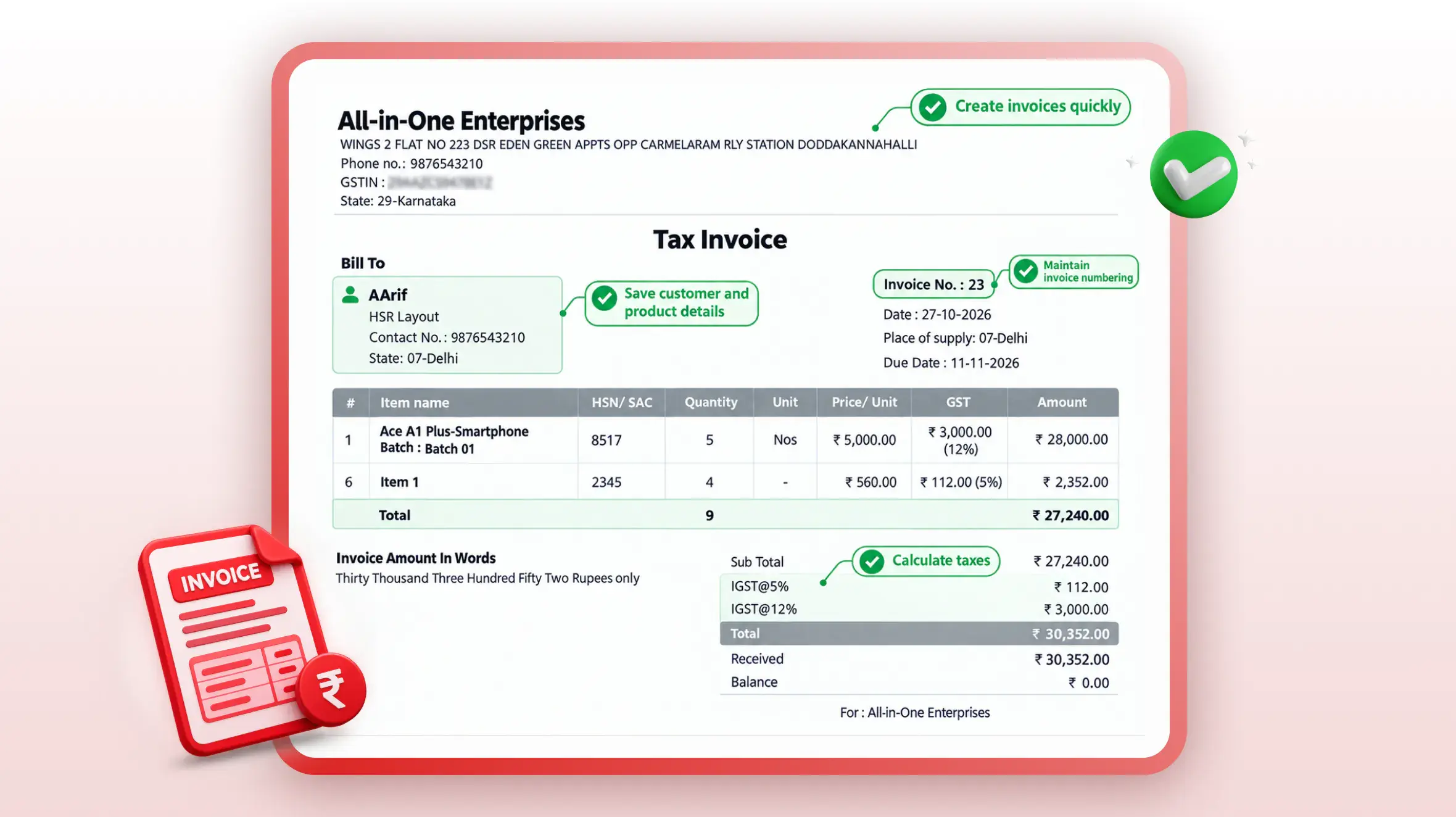
Depending on the software and features available, businesses can use it to:
Create invoices quickly
Save customer and product details
Maintain invoice numbering
Calculate taxes
Add payment terms
Track invoice status
Share invoices digitally
Follow up on pending payments
For businesses creating invoices regularly, having these tasks in one system can make the billing process easier to manage.
Conclusion
Invoice mistakes can take extra time to correct and may create confusion for both businesses and customers.
The easiest way to reduce these mistakes is to follow a simple process: enter the correct details, use a consistent invoice numbering system, check GST calculations, clearly mention payment due dates, and regularly track outstanding payments.
For businesses that create invoices regularly, invoicing software can help simplify these tasks. Features such as GST calculations, organised invoice records, and payment reminders can make everyday invoicing and payment follow-ups easier to manage.
Frequently Asked Questions
What are the most common invoice errors?
Common invoice errors include incorrect customer details, duplicate invoice numbers, wrong GST calculations, missing payment due dates, and poor payment tracking.
How can small businesses avoid invoice mistakes?
Businesses can reduce invoice mistakes by checking customer details, invoice numbers, product information, GST details, totals, and payment terms before sending an invoice. Using invoicing software can also reduce some repetitive manual work.
Can incorrect GST details cause problems?
Yes. Incorrect GST rates, tax amounts, GSTINs, or other invoice details can create problems with business records and GST-related processes. It is important to check tax information before sending the invoice.
How can businesses avoid duplicate invoices?
Using a consistent invoice numbering system and checking previous invoices before creating a new one can help prevent duplicate invoices. Software with automatic invoice numbering can make this process easier.
How can businesses follow up on unpaid invoices?
Businesses can use billing software to track paid and unpaid invoices and send payment reminders to customers for overdue payments.
Can invoicing software help with GST invoices?
Yes. Depending on the features available, invoicing software can help businesses create GST invoices, calculate applicable taxes, and include required invoice details.
I’m a business enthusiast with 8+ years of experience in business management and finance, holding a Bachelor of Business Management (BBM) in Marketing and an MBA in Finance. With expertise in marketing, accounting, financial management, business law, MIS, and business economics, I focus on simplifying complex business and finance topics into clear, practical insights for entrepreneurs, professionals, and students.
- "Tax Professional & Business Finance Expert"
Tips to Reduce Invoice Processing Time Use Invoicing Software: Create invoices digitally to reduce manual work and keep records organised. Save Customer Details: Reuse saved customer information instead of entering it for every invoice. Maintain a Product List: Save product prices, GST rates, and HSN/SAC codes for faster billing. Automate GST Calculations: Let software calculate…
KEY TAKEAWAYS E-invoicing is the electronic authentication of B2B invoices on the government’s Invoice Registration Portal (IRP) Every valid e-invoice carries a unique IRN and a QR code Generating an e-invoice takes a single click through integrated billing software An e-invoice can be cancelled only within 24 hours, and only in full After 24 hours,…
Introduction What worked five years ago no longer works. Customers ask for written quotations. Wholesalers demand clarity before dispatching goods. Transporters want documents ready in advance. Banks and GST consultants expect proper records. In all these situations, one document quietly plays a critical role: the Proforma Invoice. Yet, many small shop owners, retailers, traders, and…