I’m a business enthusiast with 8+ years of experience in business management and finance, holding a Bachelor of Business Management (BBM) in Marketing and an MBA in Finance. With expertise in marketing, accounting, financial management, business law, MIS, and business economics, I focus on simplifying complex business and finance topics into clear, practical insights for entrepreneurs, professionals, and students.
Vyapar Editorial Team represents the officially authorized content and review function at Vyapar App, a business management, billing and accounting software used by millions of SMEs. Articles published under this author are created and reviewed by subject-matter experts to ensure accuracy, compliance, and practical business value.
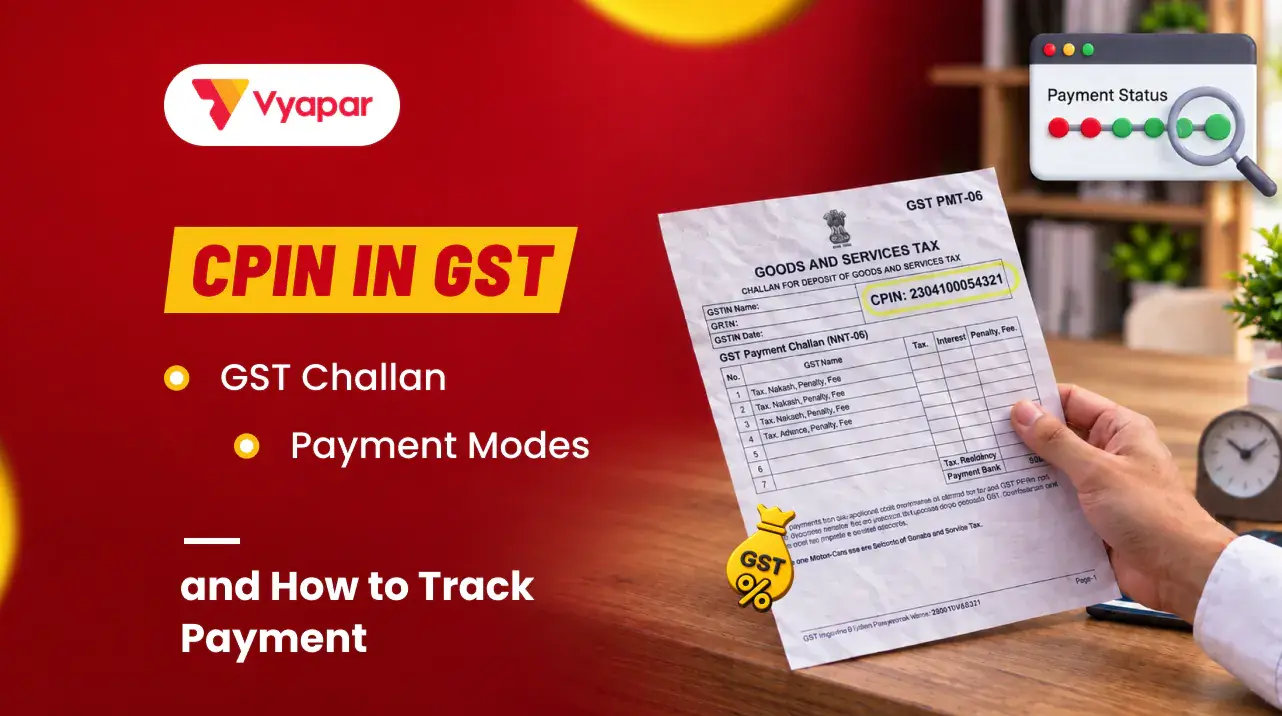
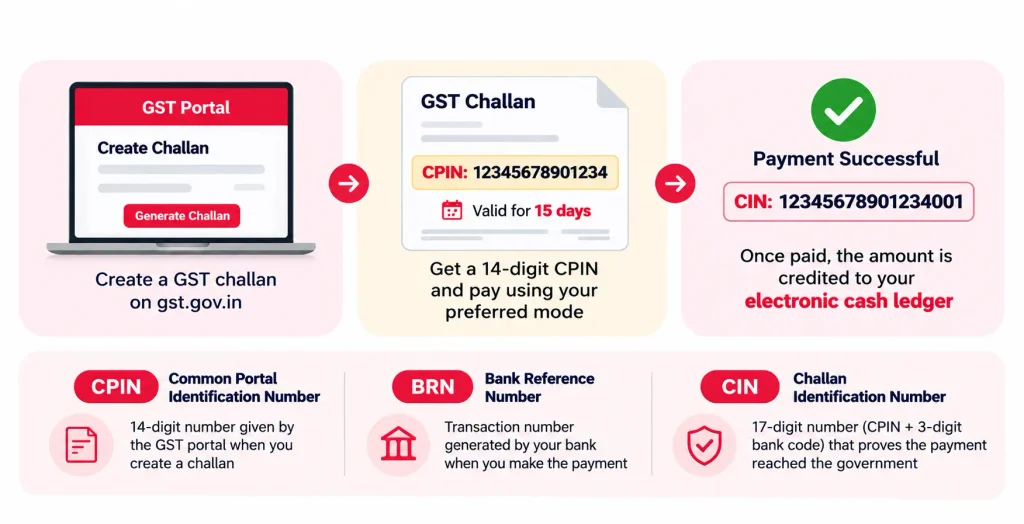
CPIN full form: Common Portal Identification Number. It is a unique 14-digit number generated by the GST portal when you create a GST challan.
CPIN validity: A CPIN remains valid for 15 days from the date of challan generation. If it expires, you must generate a new challan.
CPIN vs CIN: CPIN identifies the challan, while CIN (Challan Identification Number) confirms that the GST payment has been successfully processed.
How to generate CPIN: Log in to gst.gov.in, navigate to Services → Payments → Create Challan, enter the tax amount and generate the challan.
GST payment modes: You can pay through net banking, UPI, credit/debit cards, NEFT/RTGS or over the counter at an authorised bank.
How to track payment: Use Services → Payments → Track Payment Status on the GST portal with your GSTIN and CPIN.
Payment debited but not updated? Wait up to 24 hours. If the payment status remains unchanged, raise a grievance using Form GST PMT-07.
What is CPIN in GST?
CPIN stands for Common Portal Identification Number. It is the 14-digit number the GST portal gives every GST challan when you create it. You use the CPIN to pay the challan and to track it. A CPIN stays valid for 15 days; after that the challan expires and you create a new one.
The CPIN only identifies the challan. It does not prove payment. Proof of payment is the CIN, which the bank creates after your money goes through.
What is a GST challan?
A GST challan is the form you create on the GST portal to deposit money for GST: tax, interest, late fee, penalty or other amounts. Each challan shows the amount under each head (CGST, SGST, IGST and cess) and gets a CPIN. Once paid, the money lands in your electronic cash ledger.
A GST challan is not a delivery challan. A delivery challan goes with goods you send without a sale, such as stock moved to a branch or sent for job work. If you need that document, see our delivery challan format.
Taxpayers in the quarterly QRMP scheme use the same challan, called GST PMT-06, to pay tax for the first two months of each quarter.
Under Reason for Challan, select one of the following:
Monthly payment for quarterly return: For QRMP taxpayers making payments for the first or second month of a quarter.
Any other payment: For other GST payments, including tax, interest, penalty or fees.
If you select Monthly payment for quarterly return, choose the Financial Year, Period and Challan Type. Select either 35% Challan (fixed sum method) or Challan on self-assessment basis, as applicable. Click Proceed. For Any other payment, simply click Proceed.
Under Details of Deposit, enter the amount under the relevant tax heads (IGST, CGST, SGST/UTGST or Cess), splitting it into Tax, Interest, Penalty, Fees and Others. The portal automatically calculates the total challan amount.
Select your payment mode: E-Payment, Over the Counter or NEFT/RTGS. For NEFT/RTGS, select the remitting bank.
Click Generate Challan. If you are creating it without logging in, re-enter your GSTIN/Other ID and click Proceed when prompted.
Download the generated challan and note your 14-digit CPIN and expiry date. Complete the payment within 15 days.
Before creating the challan, calculate the exact amount using your GSTR-3B. Tax already covered by input tax credit does not need to be paid in cash; our input tax credit guide explains what you can set off.
What are CPIN, CIN and BRN?
CPIN is the challan’s number, created by the GST portal when you make the challan. BRN is the bank’s transaction number for your payment. CIN is created by the bank once the payment succeeds, and it is your proof that the tax reached the government.
Number
Full form
Who creates it
When
What it proves
CPIN
Common Portal Identification Number
GST portal
When you create the challan
Which challan you are paying
BRN
Bank Reference Number
Your bank
When you make the payment
The bank transaction
CIN
Challan Identification Number
Your bank, sent to the portal
After the payment succeeds
That the money reached the government
Keep all three with your challan. If a payment goes wrong, the portal asks for the CPIN, the BRN and the date the money left your account.
Which payment modes can you use for a GST challan?
You can pay a GST challan by net banking, credit or debit card, UPI, NEFT or RTGS from any bank, or over the counter at an authorised bank branch. Over the counter payments in cash, cheque or demand draft are allowed only up to ₹10,000 per challan per tax period.
Mode
Good to know
Net banking
Pay online from your bank account through the portal
Credit or debit card
Cards issued by Indian banks on Visa, Mastercard, RuPay, and Diners for credit cards
UPI
For UPI IDs onboarded by NPCI
NEFT or RTGS
From any bank, using the mandate form printed with the challan
Over the counter
Cash, cheque or demand draft, up to ₹10,000 per challan per tax period
How do you check your GST payment status?
You can check your GST challan payment status on the GST portal without logging in, using your GSTIN and CPIN. You can also view your complete challan history after logging in.
Method 1: Track GST payment status without logging in
Visit gst.gov.in and navigate to Services → Payments → Track Payment Status.
Enter your GSTIN/Other ID and the 14-digit CPIN of the challan.
Enter the CAPTCHA displayed on the screen and click Track Status.
The portal displays your payment status. Click View Challan to access the challan details.
If the status shows Paid, click View Receipt to view and download your GST payment receipt.
Method 2: Check GST payment status through Challan History
Log in to the GST portal using your credentials.
Navigate to Services → Payments → Challan History.
Search for a challan using its CPIN or select a date range using the From and To fields.
The portal displays the matching challans along with their payment status.
Click the relevant CPIN to view the challan details and access the payment receipt for paid challans.
What do different GST payment statuses mean?
Payment status
What you should do
Paid
The CIN is generated and the amount is credited to your electronic cash ledger. You can download the payment receipt.
Not Paid / Failed
If no money was debited, retry the payment using the View Challan option, provided the challan is still valid.
Awaiting Bank Confirmation / Clearance
Wait for the bank to confirm or clear the transaction. Avoid making a duplicate payment.
Expired
The 15-day challan validity has passed. Generate a new challan to make the payment.
Tip: You can also verify whether the amount has been credited by logging in and navigating to Services → Ledgers → Electronic Cash Ledger.
What should you do if money is debited but the challan shows unpaid?
If your bank account is debited but the GST portal does not generate a CIN or update your electronic cash ledger, wait 24 hours. If the issue persists, file a grievance using Form GST PMT-07.
Follow these steps:
1. Log in to (gst.gov.in) and navigate to Services → Payments → Grievance against Payment (GST PMT-07).
2. Select the grievance type and choose **Amount debited from bank account but Cash Ledger not updated** under the relevant grievance category.
3. Enter the payment details, including GSTIN, CPIN, challan generation date, payment mode, bank name, debit date and BRN/UTR number. For IMPS payments, provide the RRN; for card payments, enter the payment gateway details.
4. Describe the issue, attach your bank statement or payment receipt, and complete the authorised signatory verification using DSC or EVC.
5. Submit the grievance and save the acknowledgement or reference number to track its status under Enquire Status.
Note:Do not file PMT-07 if the payment status already shows Paid or if the transaction failed without debiting your bank account.
How does Vyapar help you get the GST amount right?
Vyapar GST billing software keeps your sales and purchase bills with the right tax, so the amount on your challan matches your return.
See the tax you owe: Reports, then GST Reports, then GSTR-3B shows the tax on your sales and the input tax credit on your purchases for the month.
File with fewer changes: download the GSTR-3B data as Excel or JSON and share it with your CA.
Track input credit: purchases and expenses entered with the supplier’s GSTIN count towards your credit.
For the full return, our GSTR-3B filing guide explains each table and the due dates.
I’m a business enthusiast with 8+ years of experience in business management and finance, holding a Bachelor of Business Management (BBM) in Marketing and an MBA in Finance. With expertise in marketing, accounting, financial management, business law, MIS, and business economics, I focus on simplifying complex business and finance topics into clear, practical insights for entrepreneurs, professionals, and students.
- "Tax Professional & Business Finance Expert"
KEY TAKEAWAYS GST 2.0 introduced a simplified tax structure with major slabs reduced to 0%, 5%, 18%, and 40% from 22 September 2025 The old 12% and 28% GST slabs were largely removed, with items shifted either to 5%, 18%, or 40% Daily essentials like soap, shampoo, butter, ghee, namkeen, notebooks, and insurance became significantly…
KEY TAKEAWAYS Section 44AD offers a presumptive taxation scheme for small businesses to simplify ITR filing Eligible businesses can declare 8% of turnover as income (6% for digital receipts) Turnover limit is ₹2 crore, or ₹3 crore if 95% of receipts are digital No need to maintain books of accounts or get a tax audit…
Introduction As the financial year draws to a close, many business owners feel they’ve missed the window for tax planning. In reality, there’s still time to make a few smart financial decisions before March 31 that can reduce your tax liability for FY 2025-26. For SMEs, proprietors, and professionals, year-end tax planning isn’t about complicated…