Do you need to buy barcodes for your products? Usually no. Most packaged products already come with a barcode from the manufacturer.
What is the main work involved in setting up barcode billing? Adding your products, prices, and barcodes correctly to your billing software.
Can barcode billing reduce billing mistakes? Yes. It can reduce mistakes caused by typing the wrong product or price.
Does barcode billing save more time on bigger bills? Yes. Scanning 20 items is much faster than entering them one by one.
How do you handle loose items with barcode billing? You can enter them manually, pre-pack and label them, or use a weighing scale that prints barcode labels.
Can barcode billing help with stock tracking? Yes. Scanned sales can automatically update your stock in the billing software.
Does every shop need barcode billing? No. Shops with very few products or mostly loose goods may get less benefit from it.
Introduction
When your counter gets busy, typing products one by one can slow down billing and lead to mistakes. Barcode billing lets you scan products instead, making billing faster and helping keep stock updated.
But is it worth it for every shop? It depends on how many products you sell, how busy your counter is, and how much of your stock already has barcodes.
Is Barcode Billing Worth It for a Small Shop?
Barcode billing can be useful for a small shop when you have a few hundred products and customers often buy multiple items in one bill.
It is especially helpful for shops selling packaged products such as:
Grocery items
Cosmetics
Medicines
Stationery
Clothing
Electronics and accessories
General retail products
If you have fewer products or mostly sell items by weight, the benefit may be smaller.
What Changes When You Start Using Barcode Billing?
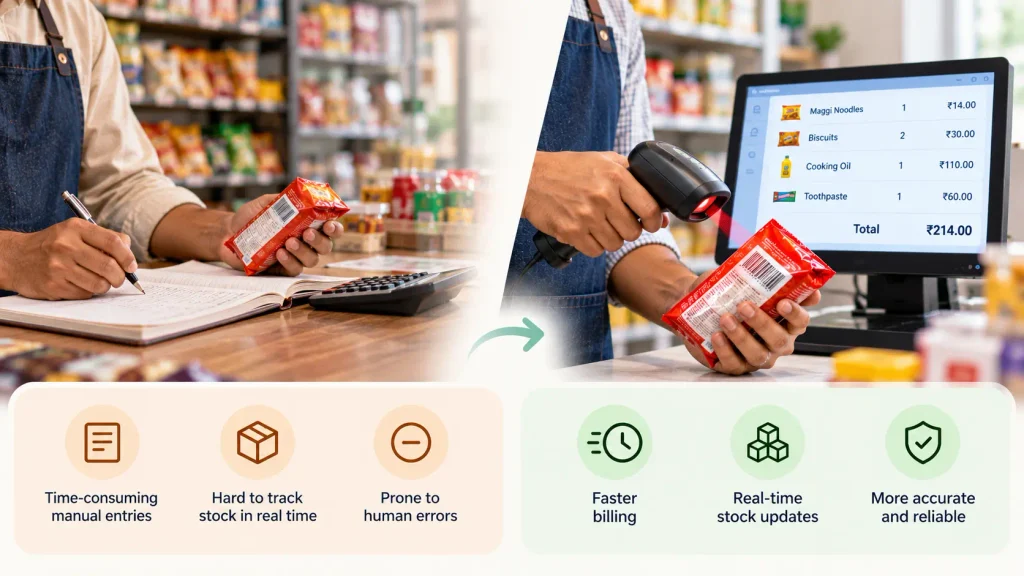
Faster product entry: Instead of searching for an item and typing it into the bill, scan the barcode to add the product quickly.
Less time on large bills: The time saved is small on a three-item bill but becomes much more noticeable when a customer has 15–20 items.
Prices are already saved: Once product prices are added to the billing software, staff do not need to remember or enter them every time.
More consistent billing: Whether you, a family member, or a staff member creates the bill, the saved product price is used.
Less manual work at the counter: Staff can scan products instead of repeatedly searching, selecting, and entering item details.
Easy setup with a barcode scanner: With Vyapar barcode billing software, you can connect a compatible barcode scanner and scan products directly while creating bills.
Which Billing Mistakes Can Barcodes Help Prevent?
Barcode billing does not remove every billing mistake, but it can prevent many errors caused by manual entry.
Barcodes can help prevent:
Wrong product selection: Scanning the product helps you select the item already saved in your billing software.
Wrong price entry: The saved selling price is pulled into the bill instead of being typed manually.
Wrong product variant: For products with different sizes or variants, scanning the correct barcode helps select the right item.
Forgotten stock updates: When a scanned item is sold, the stock can be reduced automatically through the billing system.
What barcode billing does not prevent:
A product being missed during billing: If an item is never scanned, it will not appear on the bill.
A discount being entered incorrectly: The person making the bill still needs to enter the right discount.
Unrecorded cash payments: Barcode billing cannot help if a payment is never recorded.
Deliberate misuse: A barcode system cannot prevent someone from intentionally entering the wrong quantity or skipping an item.
So, barcode billing mainly helps with mistakes caused by typing, searching and manual entry.
Do You Need to Buy Barcodes for Your Shop?
Usually, no.
This is one of the most common misunderstandings about barcode billing.
If you sell products made by other companies, most products already have a barcode printed on the packaging.
For example, a grocery store may receive packaged biscuits, toothpaste, shampoo or beverages with barcodes already printed by the manufacturers.
You simply add those barcodes to your billing software.
When do you need GS1 barcodes?
GS1 registration is generally relevant when you make or own your own branded products and want those products to be sold through other retailers or online marketplaces.
For example, suppose you make your own packaged namkeen brand and want other shops to sell it. In that case, you may need an official product barcode for your brand.
What about products you pack yourself?
Suppose your shop sells rice, dry fruits or spices that you pack yourself.
You can create an in-store barcode for those products and print labels for them. These codes can be used inside your own billing system.
Selling other brands? Use the barcode already on the product.
Selling your own packaged products? You may need your own barcode system.
How Do You Handle Loose Items With Barcode Billing?
Barcode billing can still work even when your shop sells loose products.
This is especially relevant for kirana stores, sweet shops, dry fruit stores and other businesses where some products are sold by weight.
You have a few options.
1. Pre-pack products
You can pack products into fixed sizes such as 500 grams, 1 kg or 5 kg and add a barcode label.
These items can then be scanned like any other packaged product.
2. Use a weighing scale that prints barcode labels
A weighing scale can calculate the weight and print a barcode label containing the product and price information.
This is commonly used in larger retail stores and supermarkets.
3. Keep loose products as manual items
You do not have to barcode everything.
For example, a kirana shop can scan packaged products such as biscuits and soap while entering loose rice, dal or vegetables manually.
This mixed approach is often practical for small shops.
Which Shops May Not Need Barcode Billing Yet?
Barcode billing is useful, but it is not necessary for every business.
You may want to wait if:
Your shop has very few products
If you only have 50 or 100 products, searching from a well-organised item list may already be quick enough.
You mostly sell loose products
If most of your products are sold by weight, you may not get the full benefit from a regular barcode scanner.
Your products are mostly one-of-a-kind
Some businesses deal with unique products that are sold only once.
For example, certain jewellery, second-hand goods or custom-made products may not benefit much from assigning a barcode to every item.
You are always the person billing customers
If you are the only person at the counter and already know your product prices, the need for barcode billing may be lower.
In these cases, it can make sense to first set up your billing and inventory in software. Once your product list is ready, you can add barcode billing later.
How Barcode Billing Helps You Track Stock Better?
For many shop owners, faster billing is the reason they start using barcodes.
But better stock tracking can become the bigger benefit over time.
When a product is scanned during billing, the sale can automatically update your stock.
That means you can get a clearer view of:
Which products are selling fast
Which products are not moving
What is running low
Which items have been sitting in your shop for a long time
When you need to reorder
For a shop carrying a large amount of stock, knowing what is selling and what is not can save more money than simply saving a few seconds at the billing counter.
That is why barcode billing is not only about faster billing.
It can also help you keep your billing and stock records connected.
How Can Vyapar Help With Barcode Billing?
Once you decide that barcode billing is right for your shop, the billing software you use becomes important.
Vyapar barcode billing software works with regular USB and Bluetooth barcode scanners, so you do not need special hardware tied to the software.
You can:
Scan existing product barcodes while creating bills
Generate barcodes for products you pack yourself
Print barcode labels in bulk
Update stock when products are sold
Keep scanned and manually entered products on the same bill
Manage your billing and inventory in one place
You also do not need to barcode your entire shop on day one.
A simple way to start is to add your fast-moving products first. Once those products are working smoothly, you can gradually add the rest of your stock.
This makes the shift to barcode billing easier for a small shop.
Final Takeaway
Barcode billing is not something every shop needs from day one.
It makes the most sense when you have many products, regular billing, and a lot of packaged items. It can speed up billing, reduce manual entry mistakes and, more importantly, help keep your stock updated.
For shops that are not ready for a full barcode setup, starting with digital billing and inventory tracking is a practical first step. You can add barcode billing as your shop grows.
For a shop that is ready to move from manual billing to barcode billing, Vyapar can bring billing, barcode scanning and stock tracking together in one system.
If you sell packaged products that already have barcodes, you usually only need a compatible barcode scanner.
How do I bill products sold by weight?
You can pre-pack and label them, use a weighing scale that prints barcode labels, or keep loose products as manual items while scanning the rest.
How long does it take to set up barcode billing?
The scanner itself is quick to set up. The bigger task is adding your products, prices and barcodes to the billing software.
For a small product list, this can be done quickly. Larger product lists can be added in stages.
Can two products have the same barcode?
Different products should normally have different barcodes.
If you find a duplicate or a product without a suitable barcode, you can create an internal barcode for use in your shop.
Is barcode billing useful for a small kirana shop?
It depends on the number of products and how much of your stock is packaged.
A kirana shop with a few hundred packaged products can benefit from barcode billing, while a shop selling mostly loose goods may get less benefit.
Can Barcode Billing Help Reduce Stock Loss?
Yes. It helps reduce stock loss from unrecorded sales, billing errors, and incorrect stock entries by automatically recording sales and updating stock.
However, it does not prevent physical theft or shoplifting.
Do I need a special barcode scanner?
No. Compatible USB and Bluetooth barcode scanners can work with billing software such as Vyapar.
Anshika Jain is a Product Manager at Vyapar, building products that empower millions of MSMEs to digitize, market, and grow their businesses. With experience in product strategy, user research, and customer-centric product development, she focuses on solving real business challenges through simple and scalable technology.
KEY TAKEAWAYS Free plans work fine at the start: Basic billing, GST billing, and inventory tracking are available on both free and paid plans Barcode billing speeds up checkout: Useful once your product list runs into hundreds or thousands of SKUs Udhaar follow-ups get automated: WhatsApp and SMS payment reminders replace manual calling for pending…
Introduction Picking the right pharmacy billing software is not just about billing speed. It is also about following the law. If you pick the wrong software, you can face problems during a drug inspection, make GST mistakes, or slow down your counter when customers are waiting.Many pharmacy owners choose software based on price or a…
Introduction Retail in 2026 is more competitive than ever. Customers expect quick checkout experiences, accurate billing, digital payment options, and professional invoices. At the same time, retailers need to manage inventory, GST compliance, customer records, and daily sales without spending hours on manual work. To help retailers make the right decision, I’ve compared five of…