At the end of a financial year or in between every business wants to know whether it is gaining profit or suffering with a loss. Profit and Loss Statement (P&L) is a financial statement that provides a summary of a company’s revenues, costs, and expenses incurred over a period of time. The P&L statement shows a company’s ability or inability to generate sales, manage expenses, and create profit by increasing revenue, reducing costs, or both.
The P&L Statement is one of a company’s core financial statements that shows their profit and loss based on accounting principles that include Total sale, Total purchase, Returns, Tax payable/receivable, stock value, income or expenses . The P&L statement is synonymous Known as income statement, statement of financial results or income, earnings statement, expense statement, Trading account or statement of operations.
What are the Components of Profit and Loss Statement?
As we mentioned above the Profit and Loss statement will let you know whether your business made or lost money for the specific period of time. All expenses, losses, incomes and gains are the components of Profit and Loss Account. A P&L usually has seven main components:
Revenue (sales/turnover) – Revenue is the total amount of income generated by the sale of goods or services done by a company & before any expenses are subtracted. While revenue means a money company earns, it’s possible for a company to generate good revenue but have a net loss.
Cost of goods sold – Cost of goods sold (COGS) refers to the direct costs of the goods sold by a company in case of manufacturing business or purchase price in trading, wholesale etc. including all direct expenses related to goods production or purchase.COGS is deducted from revenues (sales) in order to calculate gross profit.. Higher COGS results in lower Gains.
Gross profit/ Loss – Gross profit/Loss indicates efficiency of your business. The more profit is a good sign,as your business is making profit. If your gross profit decreases over time you will need to find the reason and take action to increase the profit margin.
Expenses – All the money you have spent on Administrative Expenses, Selling and Distribution Expenses, Depreciation or Indirect Expenses need to be considered under this header. More profitable businesses generally spend less of their income on expenses.
Other Income – All Indirect income like Discount received, Commission received, Non-Trading Income, Interest received, Bad Debts recovered, Rent received, Profit on the sale of assets etc comes under Income.
Tax – If you come under taxation all tax payable and receivables need to be added or subtract here.
Net profit/ Loss – The net profit/ Loss is an indicator of how much profit you make from every rupee you spend. If your net profit decreases that generally means you are paying more in expenses, which needs to be monitored.
What is the Purpose of a Profit & Loss Statement?
The purpose of the P&L statement is to provide the financial performance of the Company over a specific period of time. Profit & Loss Statement/Account is prepared for many reasons.
To show the revenues and expenditures of the company
To know the profits/losses earned/incurred by a business
To Complete the Statutory requirements (Companies Act, Partnership Act or any other law)
To assess the profitability of the company
To obtain net result, whether your business is making net profit or net loss
To calculate a company’s return on equity (ROE) by comparing its net income (as shown on the P&L) to its level of shareholder’s equity (as shown on the balance sheet)
Benefits of Profit and Loss Statement
P&L is the most popular and common financial statement in a business as it quickly shows the actual information about net profit/ loss generated by a business. Here are the benefits of P&L report:
It helps to address the operational efficiency of the company as your Direct/indirect expenses and Direct/indirect incomes are the part of P&L accountant.
Profit and loss report helps in making control over indirect expenses by providing important information about these expenses.
It helps you analyze how much tax you should pay for the profits you made.
Helps to track business performance which can be compared also to previous financial periods of time to track improvement in the business.
Best indicator of your business health
Helps to make future decisions, make plans and perform better
Works as financial statement, Using this information, Bank loans became easier and faster
Profit and Loss Statement V/S Balance Sheet
It is important to compare P&L statements with the balance sheet:
Profit and Loss Statement
Balance Sheet
A profit and loss (P&L) statement is a summary of a company’s revenues, costs and expenses incurred during a specific period of time.
A balance sheet provides a snapshot of a company’s assets, liabilities and shareholder equity at a certain date.
A P&L statement provides information about profit/loss generated by increasing revenue, reducing costs, or both.
A balance sheet provides investments, Creditors and Debtors
A P&L statement is an income statement
A balance sheet is a statement of financial position
Generated over a period of time (Weekly, monthly, yearly)
Generated at a single point of time (End of financial year)
Every month you look at your profit and loss statement
You’ve never thought about looking at your balance sheet
The first financial statement that is compiled from the trial balance is the P&L statement
On the other side balance sheet includes everything that doesn’t go on the income statement
Profit & loss statement is not based on sides, it works on a simple formula. “(Sale-Purchase)-(Closing stock-Opening stock) = Gross Profit/loss + Other Income – Expenses =Net Profit/Loss”
Balance has two sides: the asset side should equal the combined totals of liabilities and the owner’s equity side. “Assets = Liabilities +Owner’s Equity”
How to check Profit and Loss Statement in Vyapar?
Download Vyapar now and generate P&L statement easily
Download now
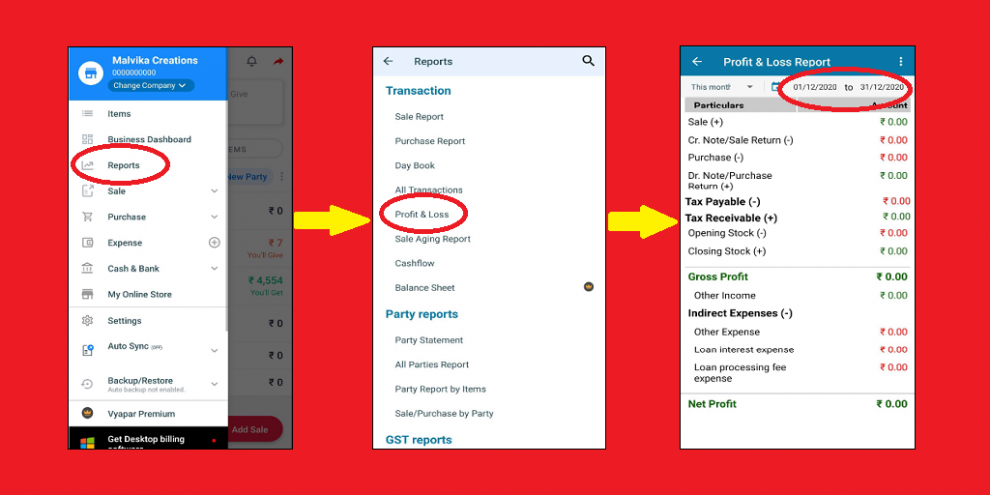
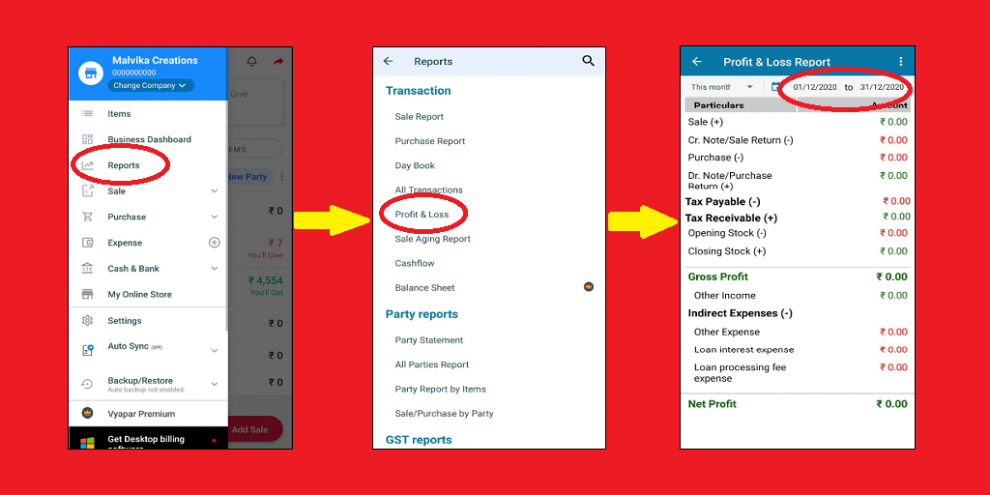
To get ready report of Profit & loss for your business from vyapar follow these steps:
1.) Click on “Reports” in left menu > Click on “Profit & Loss” > Select the certain period of time as per your need
2.) You can also print & share P&L statement in Excel & PDF
Frequenetly Asked Questions (FAQs)
When Do I Need to Prepare a Profit and Loss Statement?
You can look at your Profit & loss account anytime. With the help of a software like VYAPAR you don’t even have to prepare the P&L account, you can get the ready P&L statement anytime in just a click.
Are all companies required to prepare P&L statements?
P&L statement shows a quick check on revenue and earnings of your business. It is good to get it prepared on a monthly basis. On the other hand, Private companies are not necessarily required to comply with a set of rules and guidelines known as Generally Accepted Accounting Principles (GAAP) and some smaller companies may even not prepare formal financial statements at all.
Impact of Accounting Principles on the P&L Statement
The main factors that create a difference between profit and cash generation are:
Revenue recognition principle – revenue is often recognized before cash is received (which creates accounts receivable on the balance sheet)
Matching principle – expenses are matched to revenues during the period(s) those revenues are earned
Accrual principle – income and expenditures should be recorded during the periods they occur, not when cash is received, which can make revenue and expenses materially different from cash flow
Vyapar Editorial Team represents the officially authorized content and review function at Vyapar App, a business management, billing and accounting software used by millions of SMEs. Articles published under this author are created and reviewed by subject-matter experts to ensure accuracy, compliance, and practical business value.
Introduction Electronic items changed the human lifestyle. Like a refrigerator, fan, oven, electric induction, iron box, washing machine, etc. All we get at electronic store. These home appliances have reduced human work. Nowadays the use of electronics equipment has become more due to huge growth in technology, Which in turn is increasing the demand of…
Now you can share a creative and professionally designed Greetings with your customer at no cost. These Greeting messages go with your business name, business logo and a customized message. Vyapar application lets you share Greeting messages with your clients on WhatsApp. Benefits of Sharing Whatsapp Greeting How to Share Greetings and Promotional Messages in Vyapar App?…
It’s EASY! You have 2 ways to do it. Option 1: Reset invoice number & other transactions! STEP 1: From Left Menu, go to Utilities, Click on “Close Financial Year”. STEP 2: Under “Restart Transaction numbers”, tap on “Change Prefixes”. Not finding this option? Update to the latest version of Vyapar App. STEP 3: Change Prefixes of your invoices, delivery challan, estimate etc &…