
Trusted by MSMEs
Accounting Software for Small Business
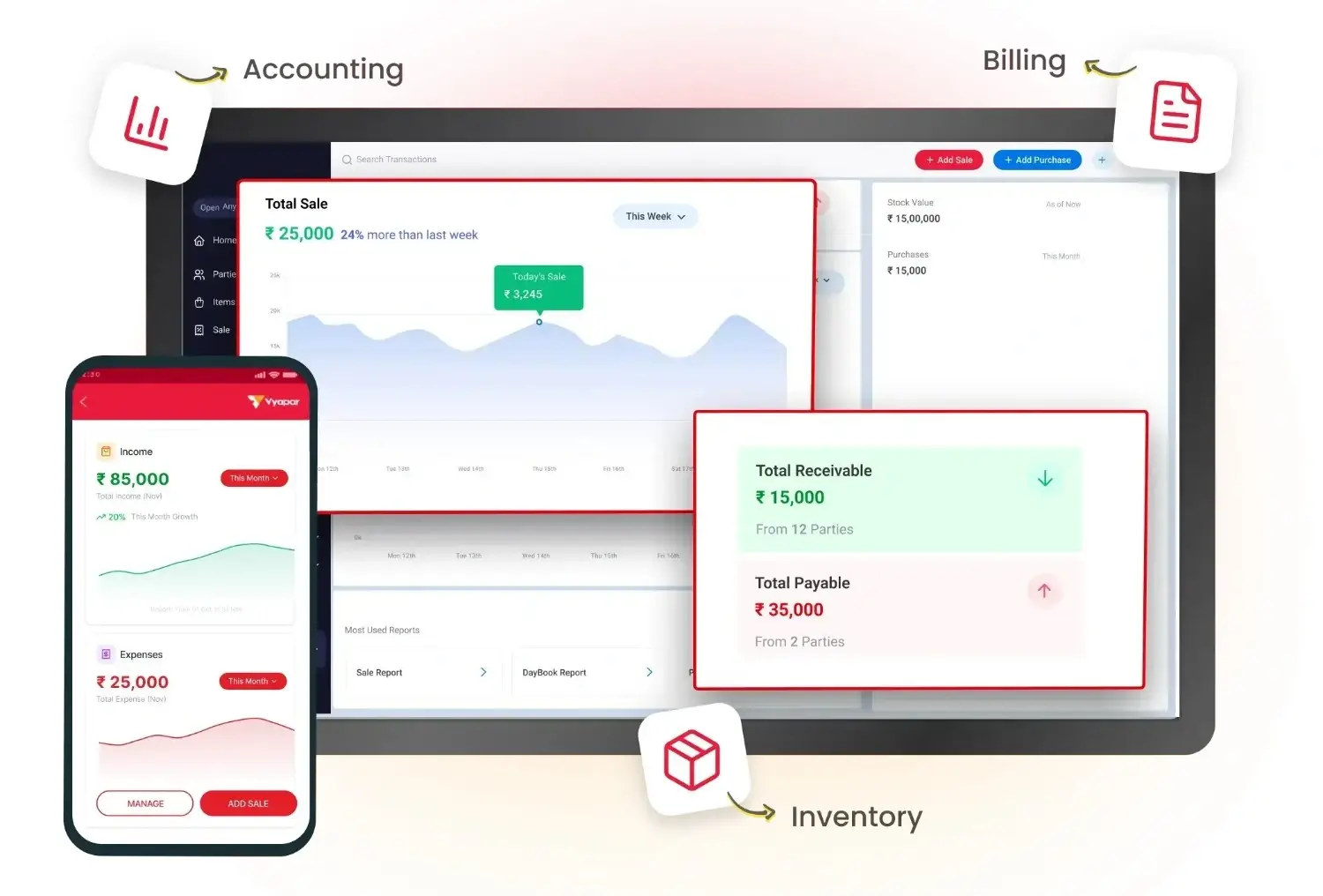
Manage your business accounts, track every rupee, and know your profits, all in one simple software.
- Automated Bookkeeping & Ledger Management
- Track Expenses, Receivables & Payables
- Instant Profit & Loss, Balance Sheet & Cash Flow Reports
What Is Accounting Software?
Accounting software, often known as bookkeeping software, helps you record, organise and manage daily financial transactions. It can bring sales, purchases, expenses, payments, customer dues and accounting reports into one place.
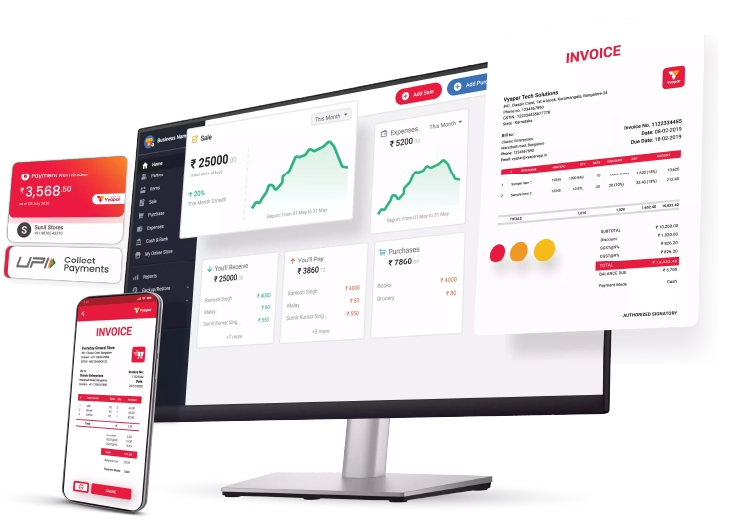
Vyapar is Indian accounting software for small business owners who want to manage accounting along with GST billing, invoicing and inventory. You can record transactions, manage ledgers, track income and expenses, monitor receivables and payables, and view financial reports without maintaining separate records.
Why Small Businesses Choose Vyapar Online Accounting Software?
Manage bookkeeping, journal entries, ledgers, receivables, payables and Trial Balance in one place, and turn recorded transactions into reports like Profit & Loss, Balance Sheet and Cash Flow.
Automated Bookkeeping
Journal Entries
Ledgers
Accounts Receivable & Payable
Trial Balance
Automated Bookkeeping: Record transactions automatically
Record sales, purchases, payments, receipts and expenses in Vyapar online accounting software and keep your day-to-day books organised. Your transactions become the base for your accounting records and reports.
Instead of entering the same information in different places, you can record your business transactions once and use the updated records across your accounting workflow.
- Less time spent on daily entries
- Fewer mistakes from writing numbers twice
- Books always ready for you and your CA
Journal Entries: Record financial adjustments
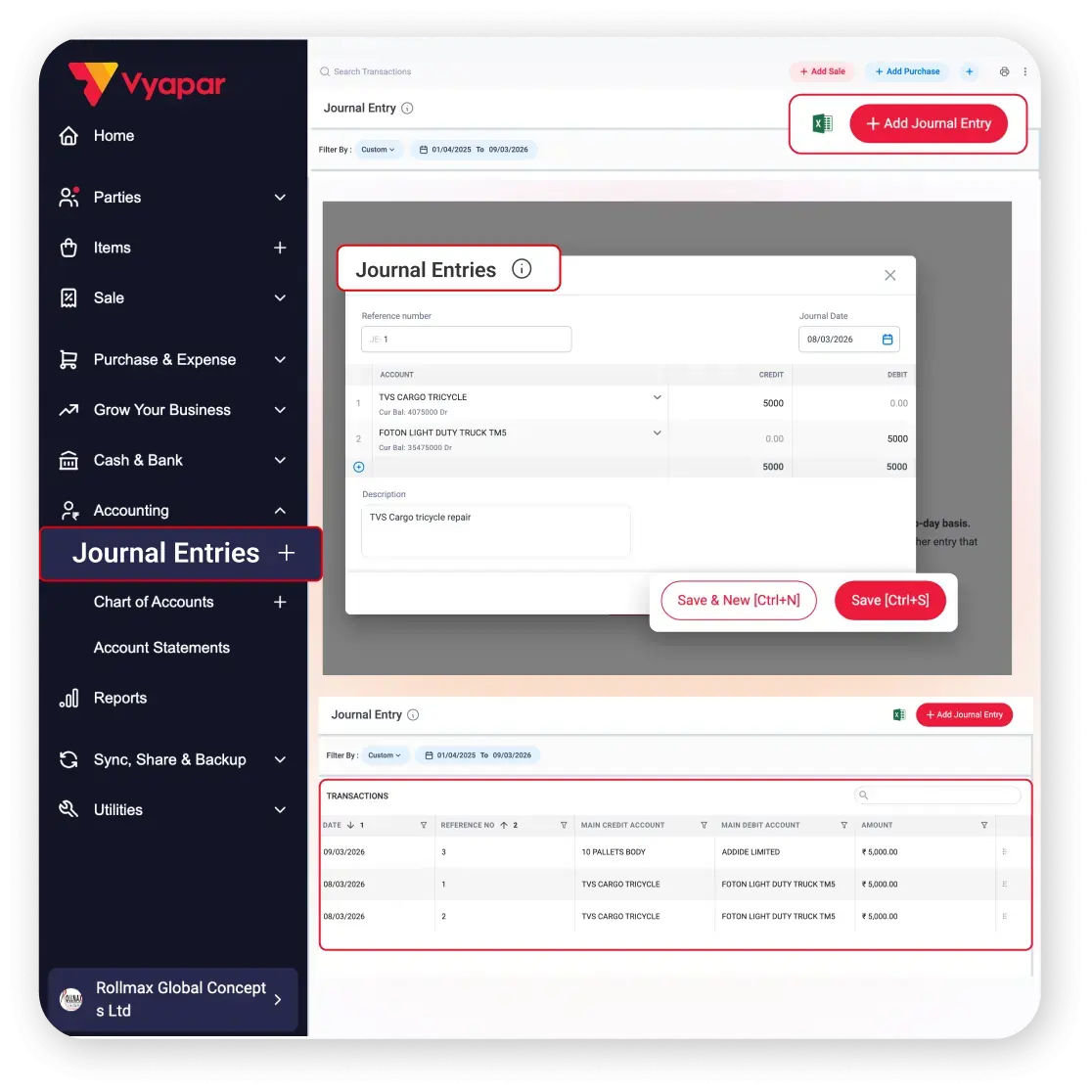
Record accounting transactions that are not handled through regular sales or purchase entries. Vyapar accounting app lets you create structured debit and credit entries for supported accounting adjustments.
Use journal entries when your business needs an accounting entry outside the normal billing or purchase workflow. This helps keep your books complete and your financial records organised.
- Every change in your accounts stays on record
- Fix mistakes without editing old bills
- Clean books at year end
Ledgers: Track all party transactions
Keep track of transactions and balances for your business accounts, customers and suppliers. Vyapar accounting software for pc helps you view account-wise information without maintaining separate manual registers.
Use ledger and account statements to understand what has been recorded, what has been paid, and what is still outstanding. This makes day-to-day bookkeeping easier to review.
- Answer “how much do I owe?” calls in seconds
- Share statements to clear payment doubts
- No more paper registers
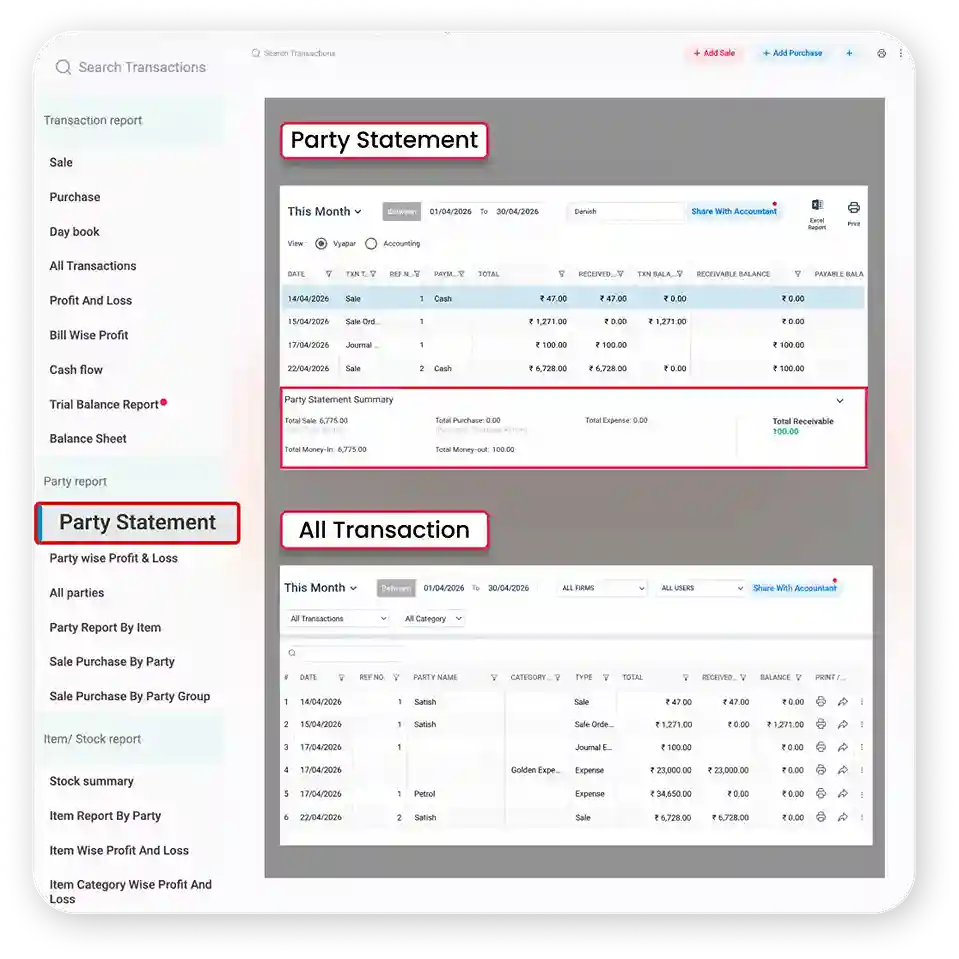
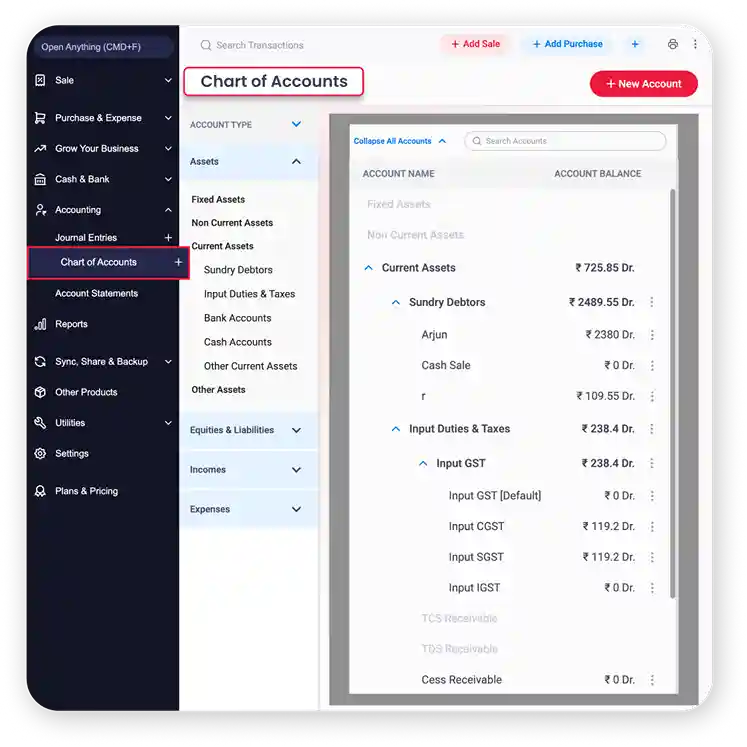
Chart of Accounts: Organise business accounts
Organise your business accounts into a clear structure with a chart of accounts. Vyapar helps you manage accounts used for income, expenses, assets, liabilities and other accounting records.
A structured chart of accounts makes bookkeeping easier to manage and helps keep financial reports organised. You can use the account structure as your business records grow.
- Accounts stay neat as your business grows
- Easy for your CA to check
- More reliable reports
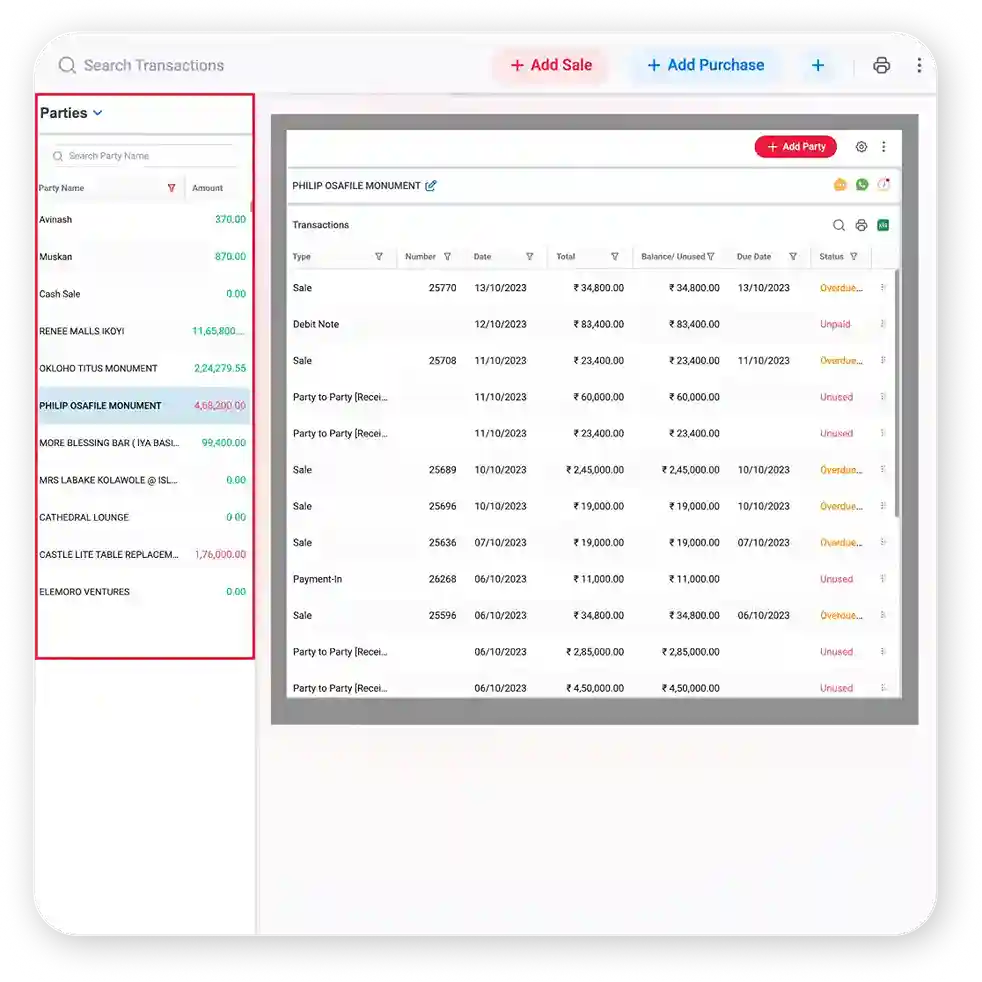
Accounts Receivable & Payable: Track money owed and due.
Keep track of money your business needs to receive from customers and payments you need to make to suppliers. Vyapar accounting app brings customer outstanding amounts, supplier dues and party balances into your accounting workflow.
Know what is due without checking separate notebooks or spreadsheets. You can review party balances, record payments, and follow up on pending amounts more easily.
- Know whom to call for payment today
- Pay your suppliers on time
- Better control over your cash
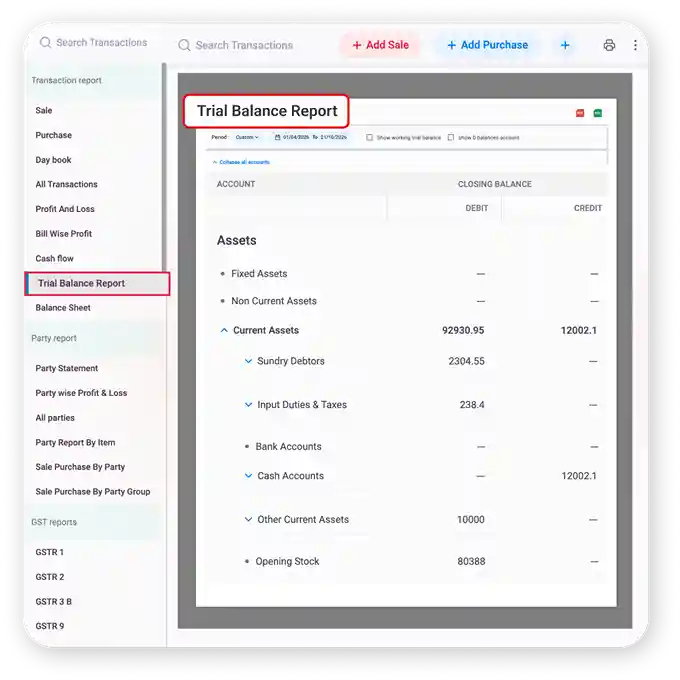
Trial Balance: Check account balances
Review the debit and credit balances of your accounts with a Trial Balance report. Vyapar brings account balances together so you can review your books in one place.
Use the Trial Balance to check your accounting records before reviewing other financial statements. It gives you a quick view of account balances and helps make your books easier to review.
- Catch mistakes before year end
- Know your books are balanced
- Less back-and-forth with your CA
Manage Cash, Bank Transactions & Payments
Keep your business payments and receipts organised along with your other accounting records. Vyapar helps you record money received and paid, track outstanding amounts and review cash movement.
Record Payments & Receipts
Record customer payments, supplier payments and other receipts as part of your daily accounting. Keeping payment entries with the related business transactions makes it easier to review party balances and pending amounts.
- Record received payments
- Record payments made
- Track payment transactions
Track Cash Transactions
Record cash sales, expenses, receipts and payments to keep your cash records organised. Use your recorded cash transactions to understand money coming in and going out through day-to-day business activity.
- Record cash income
- Record cash expenses
- Review cash transactions
Monitor Outstanding Payments
See amounts customers need to pay and amounts your business needs to pay to suppliers and other parties. Use party balances and account statements to understand pending payments and plan your follow-ups.
- Track customer dues
- Track supplier dues
- Review pending amounts and party statements
🚀 Start Using in 2 Minutes
How Vyapar Automates Your Daily Accounting
Record your business transactions once and avoid repeating the same work across notebooks, spreadsheets and separate records.
Set Up Your Business
Add business details, parties, items and GST settings.
Record Transactions
Enter sales, purchases, expenses and payments once.
Keep Accounts Updated
Ledgers and party balances stay organised.
View Reports & Insights
Review P&L, Balance Sheet, GST and more.
What Accounting Professionals Say About Vyapar!
An accounting advisor’s experience with Vyapar accounting software.
“Many of my clients were handling invoices, expenses and payments in registers or spreadsheets. With Vyapar, they manage ledgers, income, expenses and payments in one place, and get Profit & Loss, Balance Sheet and GST reports without the extra effort.”

What They Like About Vyapar Accounting Software
Free Accounting Software & Affordable Plans for Your Business
Start free on mobile, then save more and scale faster with Vyapar’s affordable accounting software plans.
Desktop
Mobile
Desktop
Free Trial
7-Day Free Trial
All Features Unlocked
Perfect for Getting Started
 Audit Trail
GSTR Reports
Expense Tracking
Fixed Assets
WhatsApp Integration
Import Parties
Silver Plan
₹3799/year
Buy for 3 Years – Save ₹2,798 Today!
Great for Small Stores
3 Firms/Businesses
Multi Device Sync
Fixed Assets
Billwise Profit/Loss Reports
Import Parties
Share with CA
Accountant Access

Most Popular
Gold Plan
₹4099/year
Buy for 3 Years – Save ₹3,198 Today!
Most popular for Growing Businesses
Everything in Silver Plan
5 Firms/Businesses
Chart of Accounts
Trial Balance & Balance Sheet
Account Statement
Add TCS/TDS on Invoices
Set Credit Limit
Payment Reminders
Retail Pro Plan
₹8,999/year
Buy for 3 Years – Save ₹7,198 Today!
Popular for Retail Businesses
All Gold Plan Features
Add Unlimited Businesses
Unlimited Firm Backups
Partywise Profit/Loss Report
Godown & Stock Transfer
Stock Transfer Report
Marketing Tools
Mobile
Free Plan
Lifetime Free
Limited Access
Perfect for getting started
Audit Trail
GSTR Reports
Expense Tracking
1 Firm/Organization
Invoice & Bill Creation
Silver Plan
₹699/year
Buy for 3 Years – Save ₹598 Today!
Great for Small Businesses
Everything in Free plan
3 Firms/Businesses
Multi Device Sync
Expenses with ITC
Balance Sheet
Fixed Assets
Share with CA
Most Popular
Gold Plan
₹799/year
Buy for 3 Years – Save ₹698 Today!
Most popular for Growing Businesses
Everything in Silver plan
5 Firms/Businesses
Journal Entries
Chart of Accounts
Trial Balance
Account Statement
TCS and TDS on Invoice
Retail Pro Plan
₹2099/year
Buy for 3 Years – Save ₹998 Today!
Great for Large Businesses
Everything in Gold plan
Add Unlimited Businesses
Godown & Stock Transfer
Complete Party Management
Comprehensive Reports
Marketing Tools
Vyapar Accounting Software Featured in Leading Publications:






GST & Compliance
Manage GST Accounting & Tax Compliance
GST is part of everyday accounting for many Indian businesses. Vyapar connects GST with regular billing and accounting work, so you can record transactions and review GST information from the same system.

GST Calculations
Vyapar calculates applicable GST on recorded transactions and helps you create GST-ready invoices and business entries. You can add HSN/SAC and other required tax details to transactions and keep GST information connected with your accounting records.

GST Reports
Use GST reports to review sales, purchases and tax information generated from your recorded transactions. Generate applicable reports, review GST transaction data and check tax information before filing, so the information needed for your filing process stays organised.

E-Invoice & E-Way Bill
Manage supported E-Invoice and E-Way Bill workflows for applicable business transactions. Create supported E-Invoices, generate E-Way Bills when required, and keep GST billing and transport documents connected to the relevant transactions instead of maintaining separate records.

Reverse Charge Mechanism (RCM)
Under the Reverse Charge Mechanism (RCM), the responsibility to pay GST shifts from the supplier to the recipient for applicable transactions. Vyapar helps businesses record GST purchase transactions involving reverse charge, maintain GST details for RCM transactions and keep purchase and tax records organised for reporting.

TDS & TCS
Manage applicable TDS and TCS transactions and reports when these requirements apply to your business and plan. Record applicable transactions, review related tax reports and keep tax information organised with your accounting records so you can review the amounts when needed.

Audit Trail
Track changes made to transactions with a history of edits and deletions. Audit Trail gives you a clearer record of changes in your business accounts, so you can review transaction changes, check why a transaction was changed and improve control over your bookkeeping.
Create Invoices That Automatically Update Your Accounts
An invoice is not just a document you send to a customer. It is also part of your business records. Vyapar connects invoicing system with your accounting workflow so sales, customer balances and payments stay organised.
GST & Non-GST Invoices
Create GST and non-GST invoices with your business, customer, item, tax and payment details. Add HSN/SAC codes, customise invoice formats and keep every invoice connected to your sales and accounting records.
Paid, Unpaid & Overdue Invoices
Keep track of customer payments and amounts still due after an invoice is created. View payment status, check overdue invoices and review party balances so you know which customer payments need attention.
Payment Reminders
Send payment reminders when customer invoices are due. Follow up on pending payments without a separate reminder list, reduce manual follow-ups and keep outstanding invoices visible as part of your receivables process.
Credit & Debit Notes
Record credit notes, debit notes, sales returns and supported adjustments when a transaction needs to be corrected or changed. Keeping them in your accounting workflow maintains clearer customer balances and transaction records.
Quotations to Invoices
Create professional quotations or estimates and share them with customers before confirming a sale. Once a quotation is accepted, convert it into an invoice without entering the same details again.
Recurring Invoices
Create recurring invoices for customers who are billed regularly. Set the billing schedule once, manage it from one place and reduce the need to create the same invoice manually every time.
Financial Reports That Help You Understand Your Business
Accounting becomes useful when you can turn transaction records into information you can act on. Vyapar provides accounting, party, GST, tax, expense, sales, purchase and inventory reports to help you understand your business.
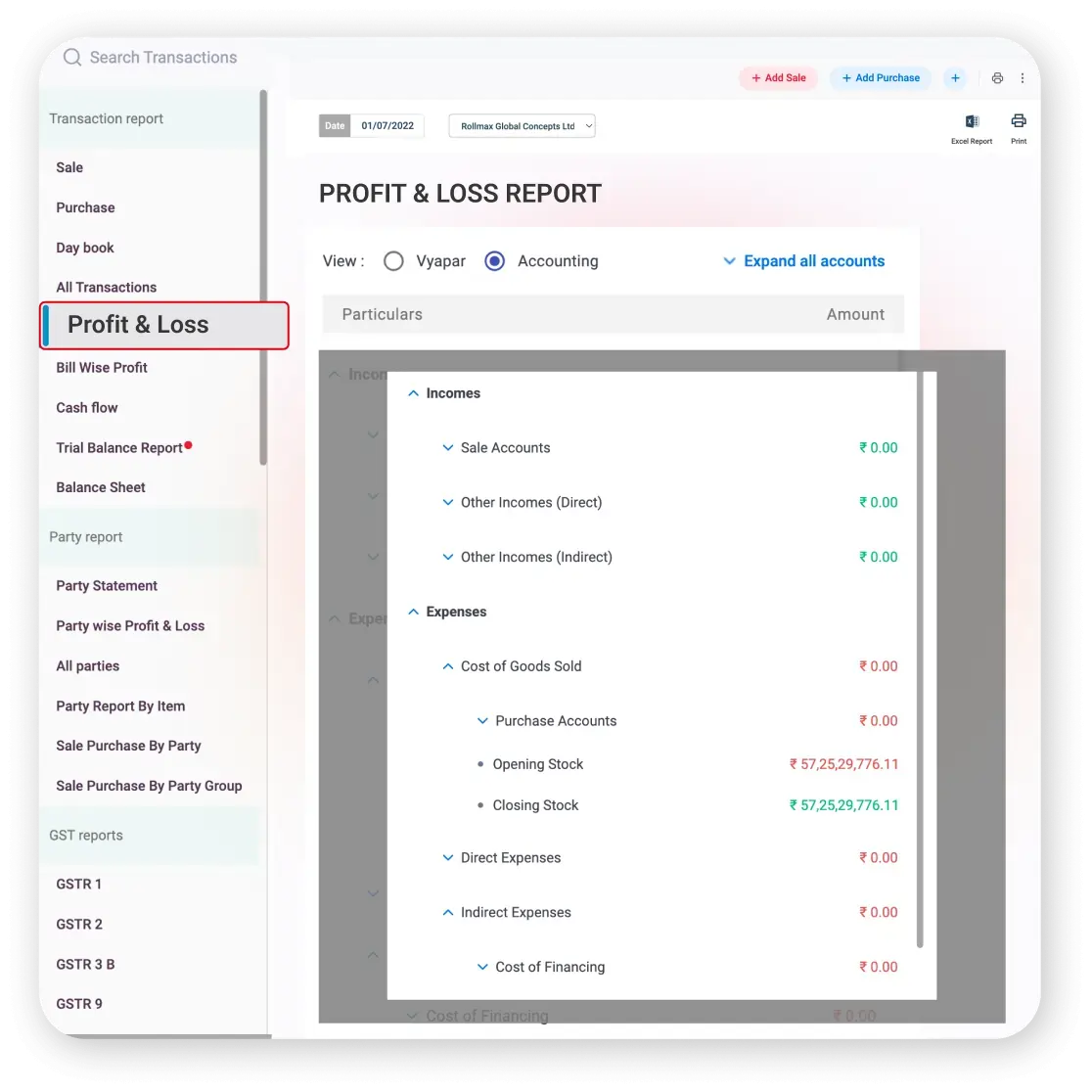

Profit & Loss Reports
Understand your business performance with clear Profit & Loss reports. Vyapar shows income, expenses and net profit in one simple view.
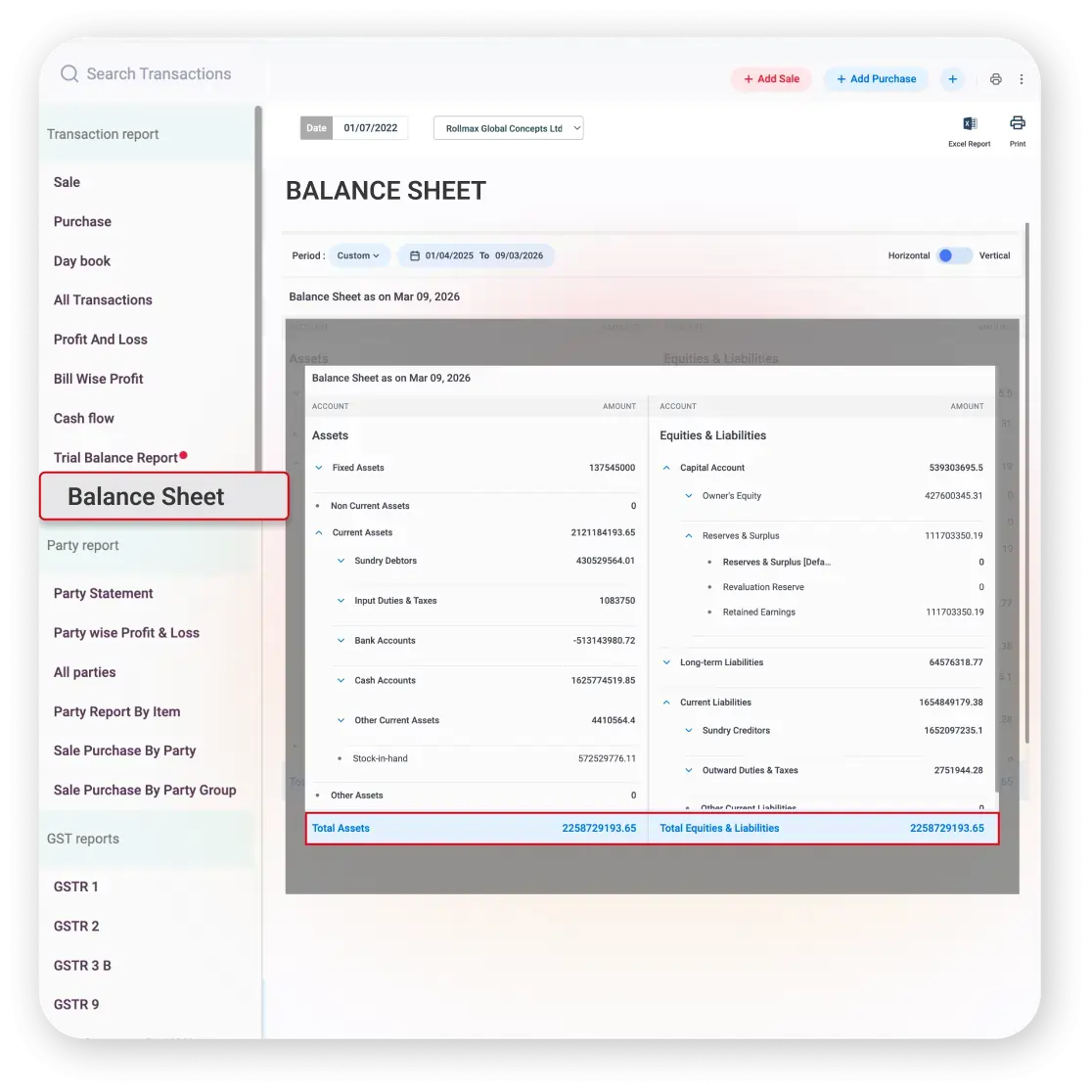
Balance Sheet
Understand your business’s financial position with a clear Balance Sheet report. Vyapar shows assets, liabilities and equity in an organised report.
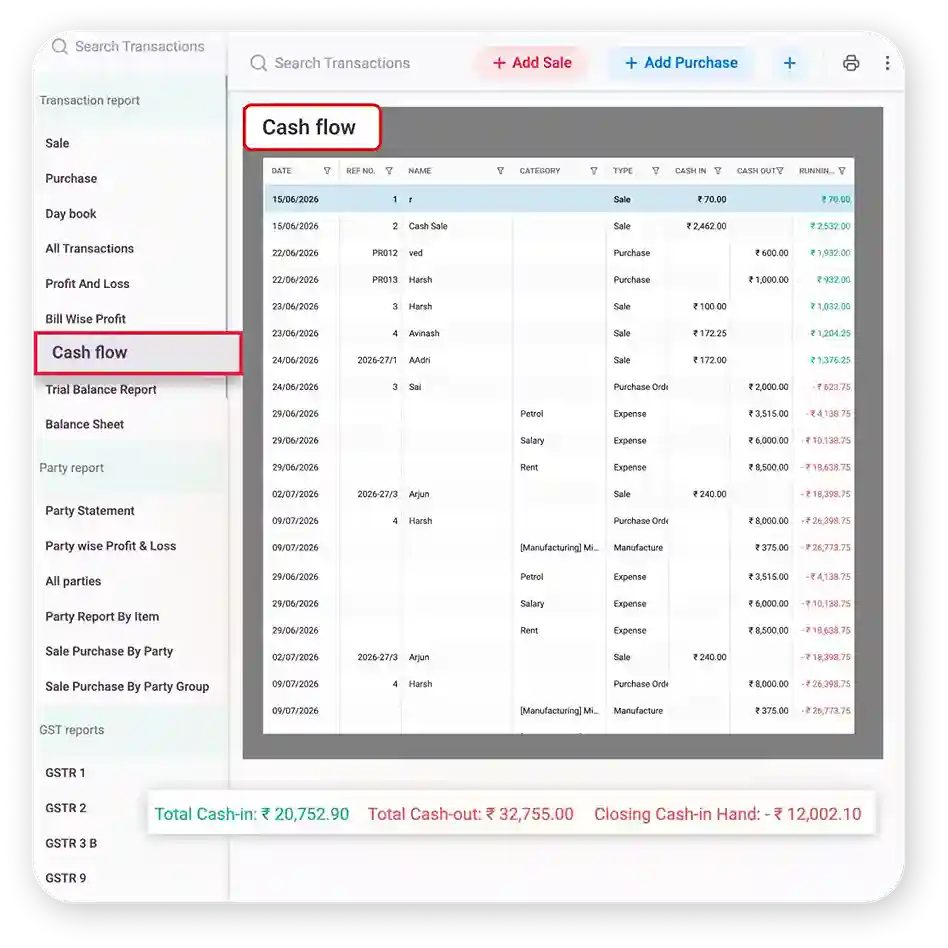
Cash Flow Reports
Track the movement of money coming into and going out of your business. Vyapar helps you review cash movement from recorded transactions.
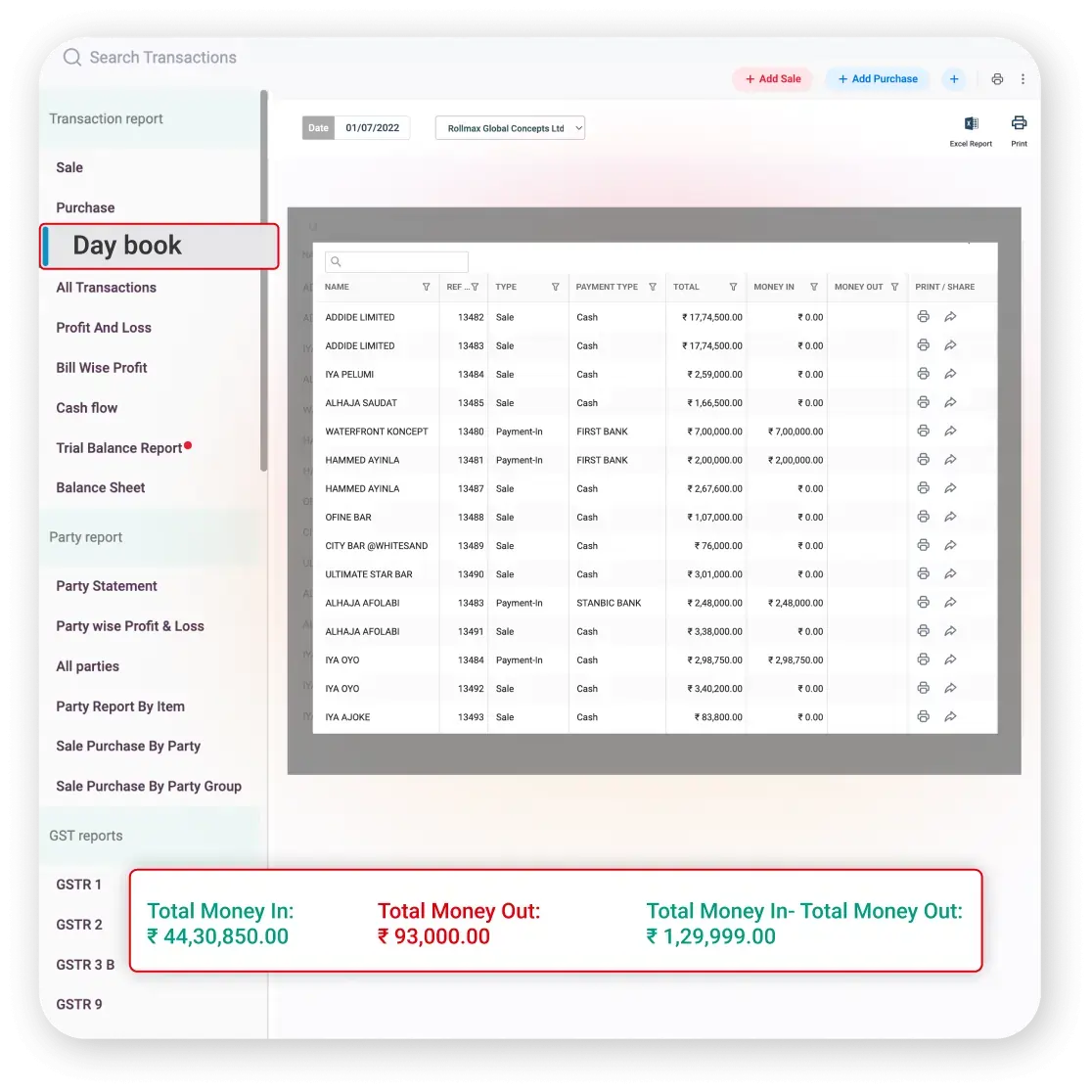
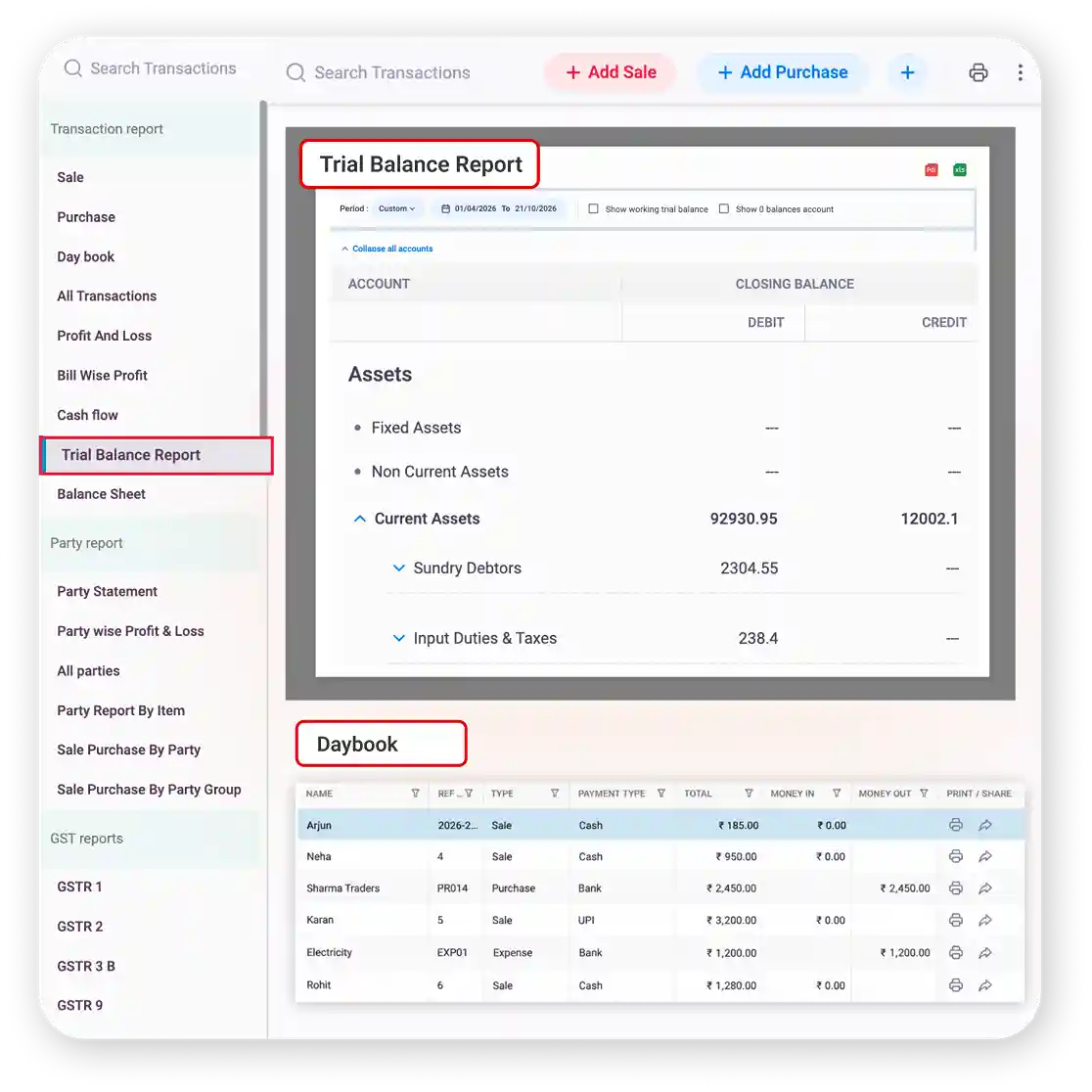
Trial Balance & Day Book
Review account balances and day-to-day transactions with Trial Balance and Day Book reports.
What Makes Vyapar the Best Accounting Software
The best accounting software for a small business is one you can use every day without help. Here is how Vyapar compares with other accounting software.
Ease of Use
Simple screens made for shop owners. No accounting knowledge needed.
Often made for accountants, so you or your staff may need training.
Start using it from day one, without hiring an expert.
Mobile & Desktop
Works on Android, iPhone, Windows and Mac.
Mostly runs on one computer. Mobile access is limited or costs extra.
Check your accounts from your shop, your home or on the move.
Multi-User
Add staff and your CA as users, and choose what each one can see or edit.
Extra users often cost more, or everyone shares one login.
Your team works together while you stay in control.
GST Ready
GST bills, GST reports, e-invoice and e-way bill built in.
GST work may need extra setup or separate tools.
Less stress when it’s time to file GST.
Online & Offline
Works online and offline. Your data syncs automatically when you’re back online, with cloud backup to keep it safe.
Either needs internet all the time or works on one computer only.
Your billing doesn’t stop when the internet does.
Payment Follow-Ups
Share bills on WhatsApp and send payment reminders from the app.
You follow up with customers by calls and messages yourself.
Collect pending payments sooner.
Cost
Free plan on mobile and low-cost paid plans.
Licence fees, setup charges and yearly renewals.
Keep more of your money in the business.
Switching Over
Import your parties and items in bulk from excel or other software.
Old records often have to be typed in again.
Move to Vyapar without starting from zero.
Keep Inventory and Accounting Connected
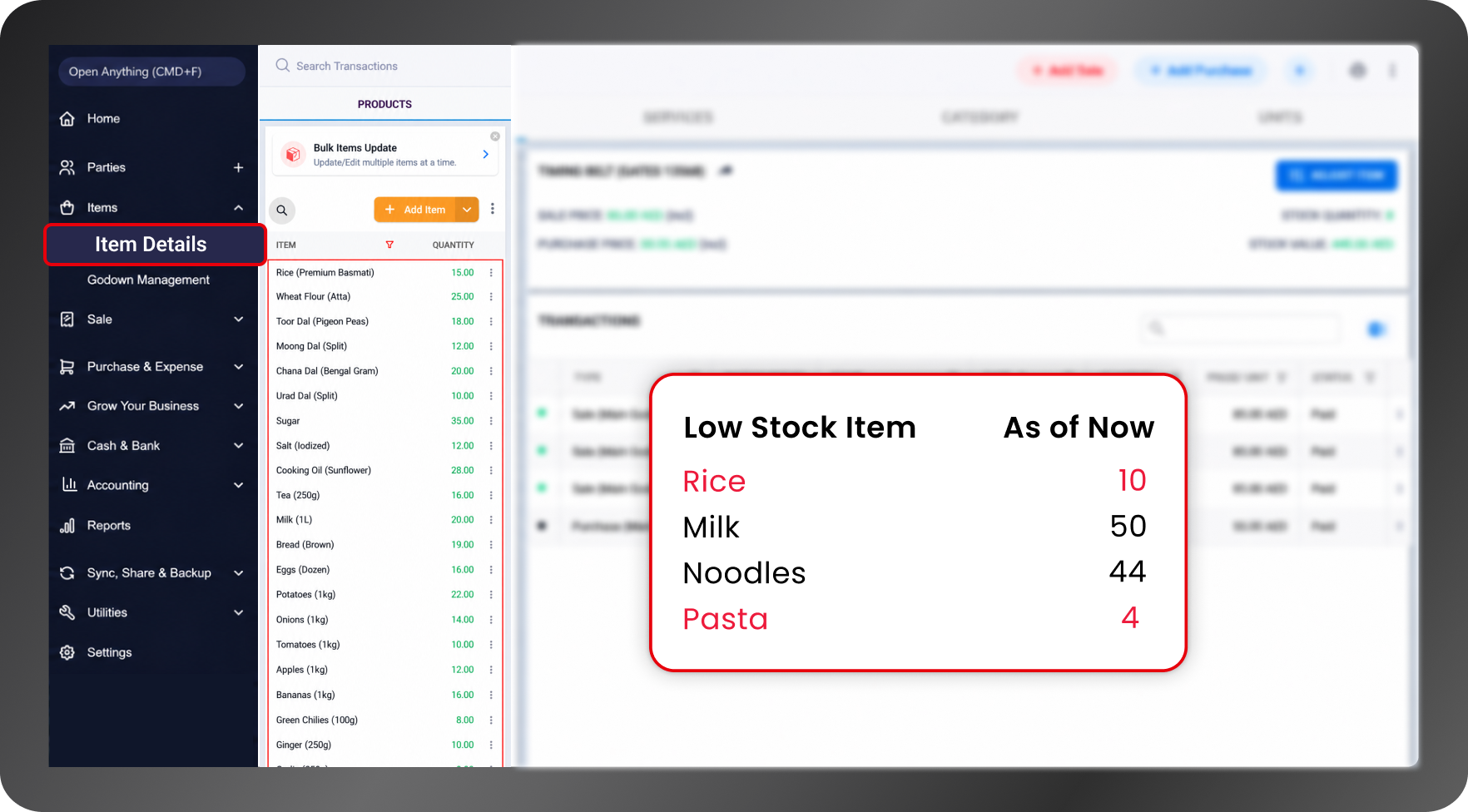
If you sell products, your stock is part of your accounts. Vyapar links your inventory management system with your books, so stock changes show in your numbers too.
Purchases Update Stock and Dues
Save a purchase bill once, and the item stock goes up and the supplier’s balance updates together. No separate stock register needed.
Know What Your Stock Is Worth
Stock reports show how much money is sitting in your stock. Closing stock is also counted in your Profit & Loss.
See Profit by Item and Bill
Each sale is matched with the item’s buying price, so you can see which items and bills give you the most profit.
Manage Your Accounts on Mobile and Desktop
Manage your business accounts with Vyapar on your preferred device, whether you use a smartphone or a computer.

On Mobile
Manage invoices, record transactions, and track payments on the go with Vyapar’s accounting app for Android, or use Vyapar on your iPhone to keep an eye on your business even when you’re away.

On Desktop
Use Vyapar accounting software for PC to manage accounts, create bills, and review financial reports on your Windows computer, or use Vyapar’s Mac accounting software to manage your business accounts from your Mac.
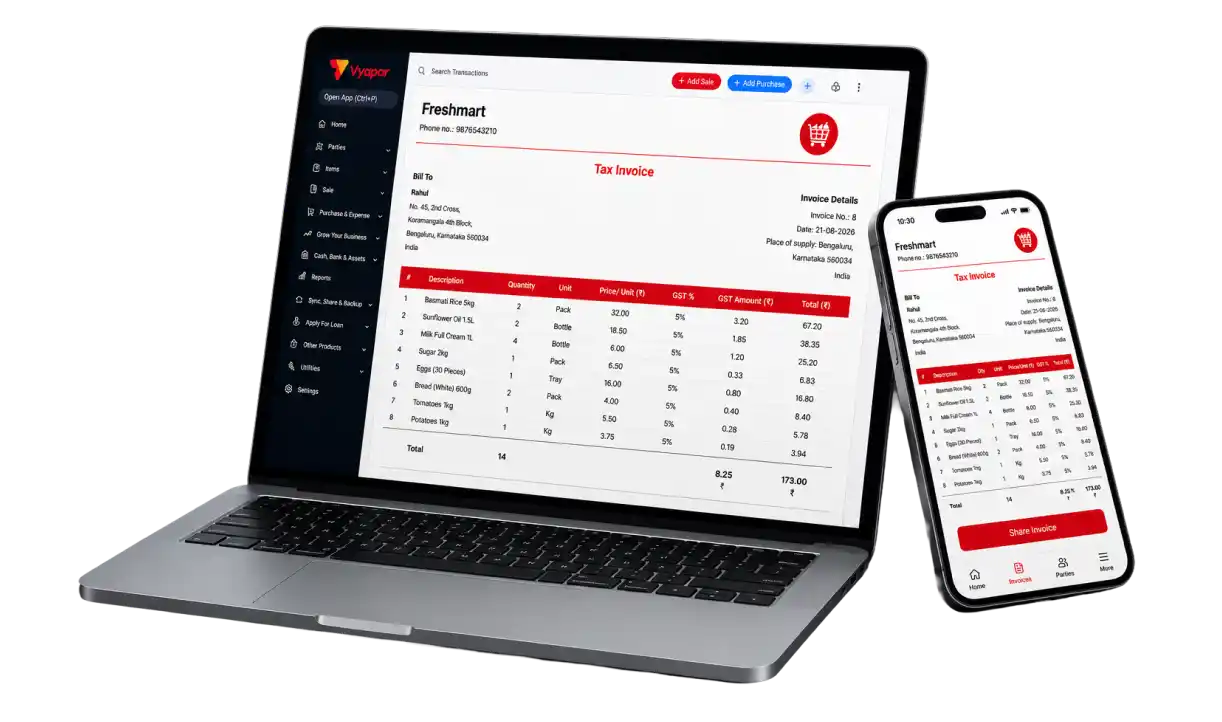
Grow Your Business to the Next Level with the Vyapar App!
Keep Your Accounting Data Secure
Your accounting data contains important information about your business. Vyapar uses account access, encryption and security measures designed to help protect your business records.
OTP-Based Login
Use OTP-based authentication as part of account access. OTP verification adds an additional step during login to help protect access to your business account and prevent unauthorised access.
Encryption & Access Protection
Vyapar uses encryption and access protection measures to help safeguard business information. Account access controls help protect your account and business data for safer day-to-day accounting.
Backup
Business data backup helps keep your accounting information available according to your product setup. Backups add another layer of protection for important business records and help reduce the risk of data loss.
Trusted by Businesses
Across India
1.5cr+
Businesses Managing Accounts
50+
Accounting & GST Reports
10M+
Invoices Generated
70+
Industries served
4+
4+ star ratings on review sites
Security
Security & backup controls
❝ Highly rated by users ❞




Frequently Asked Questions
Find answers to common questions about Vyapar accounting software, features and everyday business use.
The best accounting software helps small businesses manage bookkeeping, GST, invoices, expenses and financial reports in one place. Vyapar brings billing, accounting and inventory management together for Indian businesses.
Bookkeeping software helps you record daily sales, purchases, expenses and payments in an organised way, instead of in notebooks or Excel. Vyapar works as bookkeeping software for small business owners and also prepares your accounting reports.
Vyapar includes bookkeeping, journal entries, ledgers, a chart of accounts, receivables and payables management, GST accounting, and financial reports such as Profit & Loss, Balance Sheet, Trial Balance and Cash Flow.
Vyapar helps you manage GST billing, calculate applicable GST, prepare GST reports, and handle supported E-Invoice and E-Way Bill workflows.
Yes. Vyapar provides Profit & Loss and Balance Sheet reports to help you understand your business income, expenses, assets and liabilities. It also provides Trial Balance, Cash Flow and other business reports.
You can use Vyapar’s journal entry feature to record accounting adjustments and other transactions, helping you maintain your business accounts.
Vyapar helps you manage receivables and payables by tracking customer and supplier balances, outstanding amounts, recorded payments and account statements.
Yes. Vyapar connects sales and purchase transactions with inventory records, helping you track stock and manage business accounts in one place.
Vyapar is used by retail shops, wholesalers and distributors, traders, manufacturers, service businesses, restaurants and food businesses, and pharmacies and medical stores. It also suits growing businesses that want to move from notebooks and spreadsheets to digital accounting.
No. Vyapar is designed for small business owners who want to manage their accounts without needing accounting knowledge.
Vyapar is available on Android and iOS mobile devices, Windows desktop computers and Mac computers. You can manage your business billing, inventory and accounting using the device that suits your needs.
Yes. Vyapar supports offline use for many everyday business tasks, such as billing and inventory management. An internet connection is needed for online services and syncing data between devices.
You can share business accounting information with your CA or accountant using Vyapar’s sharing and accountant-access features.
Vyapar’s Audit Trail records changes made to transactions, including edits and deletions. This helps you review changes in your business records.
Vyapar lets you import item and party details, reducing the need to enter product and customer information manually.
Yes. Vyapar offers free accounting software for small business in India through its mobile app, with the main billing and accounting features. The desktop app comes with a free trial, and paid plans add features like multi-device sync, more firms and extra reports. See the Vyapar pricing page to compare plans.
Vyapar uses security measures such as OTP-based login, encryption and data backups to help protect your business information.
Vyapar works with business equipment such as thermal printers, barcode scanners, weighing scales and label printers. Available connections depend on the device and setup.
Still have questions?
Explore Related Vyapar Accounting Solutions
➢ Accounting Software for freelancers
➢ Accounting software for construction business
➢ Accounting software for church
➢ Accounting software for travel agency
➢ Accounting software for growing business
➢ Accounting software for daycare
➢ Accounting software for food manufacturers
➢ Accounting software for consultants
➢ Accounting software for advertising agencies
➢ Accounting software for Ecommerce
➢ Accounting software for lending
➢ Accounting software for real estate
➢ Accounting software for architecture firm
➢ Accounting software for property investors
➢ Accounting Software for bank reconciliation
➢ Accounting software for farm
➢ Accounting software for healthcare organization
➢ Accounting software for interior designer
➢ Accounting software for diamond industry
➢ Accounting software for photography
➢ Cloud based accounting software
➢ Offline accounting software
➢ Accounting software for government agencies





